Tracking habits is hard enough when you sleep in the same bed every night. Add new time zones, spotty airport wifi, and a different desk every few weeks, and most habit apps fall apart — they assume a fixed location, a stable schedule, and a phone that’s always online.
Table of Contents
Google Sheets fixes most of that because it’s free, works on any device with a browser, syncs automatically when you’re back online, and can be set up to work offline for the inevitable long flights and dead-zone train rides. Below is a layout you can build in a few minutes, plus a free, no-sign-up spreadsheet (and PDF version) attached to this post that already follows it.
Download the Free Habit Tracker for Digital Nomads
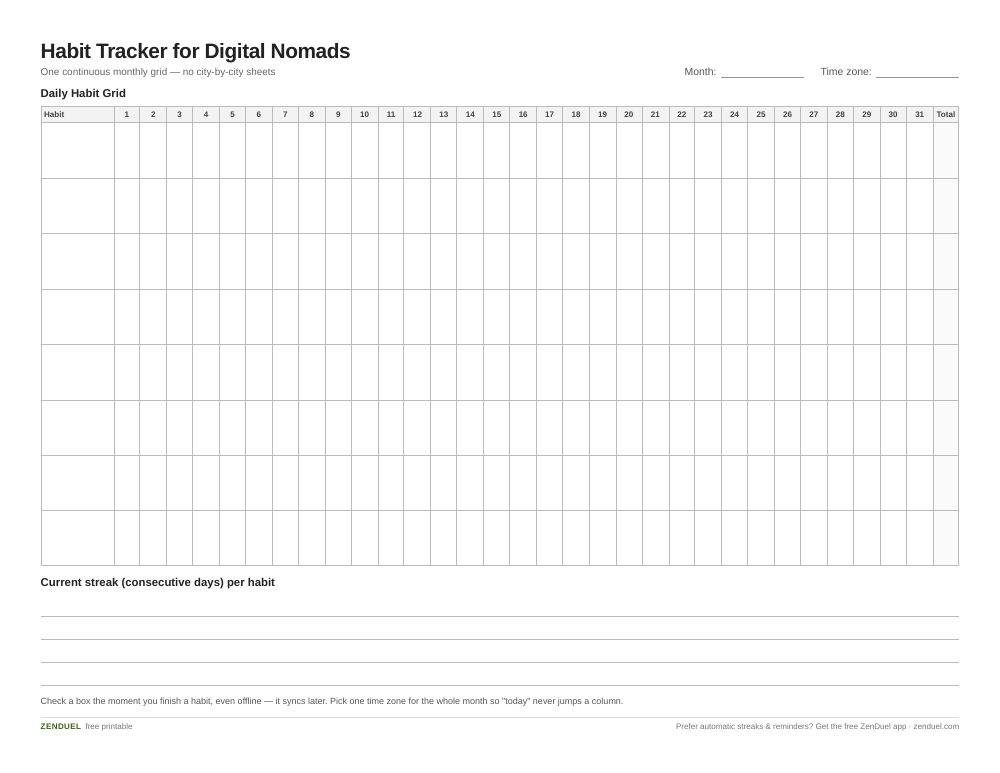
Our own template — free, no sign-up, no email required. Eight open habit rows across a 31-day grid with a monthly total column. US Letter (prints fine on A4). For Google Sheets, upload the .xlsx via File → Import.
Habit Tracker for Digital Nomads (Excel / Google Sheets) Habit Tracker for Digital Nomads (PDF)
Quick Answer
Use a single Google Sheets tab with habits as rows and dates as columns, checkboxes for each day, a COUNTIF formula to total how many days you completed each habit this month, and a simple running-counter formula to track your actual consecutive-day streak. Turn on offline access in Google Drive (and the Google Sheets mobile app) so you can check off habits even without signal, and set your spreadsheet’s time zone deliberately so dates don’t shift when you cross borders.
How to Build the Tracker
Put habit names down column A, one per row (rows 2 through 11 covers up to ten habits comfortably). Across row 1, starting in column B, add one column per day of the month, labeled with just the date number or a short date like “Oct 1.” Select the full grid of day columns under your habit rows, then use Insert > Checkbox so every cell becomes a tappable box instead of typed text.
Add a totals row below your last habit that uses COUNTIF to add up how many habits you checked off on each day, and a totals column after the last day that uses COUNTIF to add up how many days out of the month you checked off each habit. That column tells you your monthly completion count — useful, but it’s not a streak, since a habit done on 20 scattered days totals the same as one done 20 days in a row. For a real current streak (consecutive days with no gaps), add one more thin row under each habit, running alongside the same date columns: each cell there adds 1 to the cell immediately to its left if that day’s checkbox is checked, or resets to 0 if it’s blank. The value in that row under today’s date is always your live, consecutive-day streak for that habit, and it snaps back to 0 automatically the moment you miss a day.
A simple conditional formatting rule (custom formula checking whether the checkbox cell is TRUE, filled green) turns every checked box into a quick visual trail, so you can often eyeball a streak just by scanning for an unbroken run of green before you even look at the counter row.
Keep everything on one tab rather than splitting habits across multiple sheets or months. One continuous tab is far easier to keep in sync across your phone, laptop, and any shared or hostel computer you log in from — no IMPORTRANGE links or file-merging required.
Making It Work on the Road
Set a deliberate time zone instead of letting it drift with you. Google Sheets pulls its date/time zone from File > Settings in the spreadsheet itself, not automatically from your current location, so if you use formulas like TODAY() to highlight the current day, pick one time zone (home base or UTC) and stick with it for the whole tracker — otherwise a midnight flight can make “today” jump a column.
Turn on offline access before you need it. In Google Drive settings, enable “Create, open, and edit your recent Google files on this device while offline,” and in Chrome or Edge install the Google Docs Offline extension. On your phone, open the Google Sheets app, tap the three-dot menu on the file, and toggle on offline access — then checking off habits works even mid-flight or with no SIM, and it syncs the moment you’re back on wifi.
Use the mobile app for daily taps, the desktop version for setup. Checking a box from your phone takes two seconds between buses or flights, while adding new habits, tweaking formulas, or reviewing the month is easier on a laptop screen.
Tips and Common Mistakes
Don’t rebuild the sheet every month. Duplicate the tab (right-click the tab name > Duplicate) and clear the checkboxes rather than starting from scratch — this preserves your formulas and formatting. Avoid merging cells around your checkbox grid; merged cells break checkboxes in Google Sheets entirely. Keep the habit list short (5-8 habits) while you’re traveling heavily — a tracker with 20 habits is the first thing that gets abandoned when your schedule is unpredictable. Don’t mistake your monthly totals column for a streak — if you only track one number, make it the running streak counter, since that’s the one that actually tells you whether a habit is sticking. Finally, resist the urge to make a separate tab per city or trip; one continuous timeline is what actually shows you whether a habit survived the move.
Explore more: more habit-building guides.
Google Sheets habit tracker FAQs
Is a Google Sheets habit tracker really free?
Yes. Google Sheets is free with any Google account, with no premium tier required for checkboxes, conditional formatting, or offline access.
Will my habit tracker still work without internet?
Yes, once you enable offline access in Google Drive settings (desktop) or toggle offline access on the file in the Google Sheets mobile app. Changes save locally and sync automatically the next time you’re connected.
Do I need a different tracker for each time zone I visit?
No — use one continuous sheet and set a single fixed time zone under File > Settings so your dates stay consistent no matter where you’re logging in from.
Skip the Spreadsheet — Track It in ZenDuel
Habit streaks, mood tracking, and accountability duels in one free app — no template maintenance required. Get ZenDuel.
Want a calmer inbox? Subscribe to the free newsletter.
Photo: ParhamGraphic / CC0, via Wikimedia Commons.
