Practicing an instrument well isn’t about marathon sessions once a week — it’s about showing up consistently, even for 20 minutes a day. A simple spreadsheet can do more for your progress than an expensive app, because it forces you to actually look at your routine: what you practiced, how long, and whether you’re improving the tempo on that tricky passage.
Table of Contents
Below is a layout for a free Google Sheets habit tracker built specifically for practice routines — scales, repertoire, sight-reading, and metronome goals — plus the reasoning behind each column so you can adapt it to your instrument. You can build this yourself in Sheets, or grab the ready-made version (Google Sheets .xlsx plus a printable PDF) attached to this post, which already matches the layout described here.

Download the Free Free Practice Log for Musicians
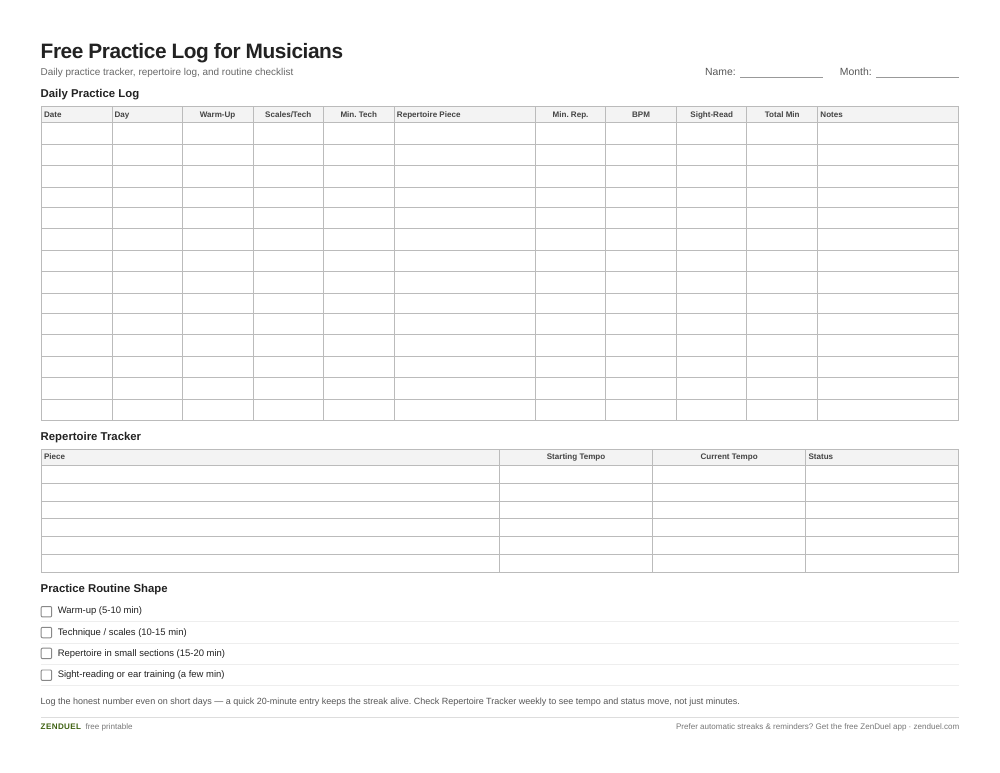
Our own template — free, no sign-up, no email required. A daily practice log with checkboxes and BPM tracking, a repertoire status tracker, and a practice-routine checklist. US Letter (prints fine on A4). For Google Sheets, upload the .xlsx via File → Import.
Free Practice Log for Musicians (Excel / Google Sheets) Free Practice Log for Musicians (PDF)
Quick Answer
A daily practice log in Google Sheets needs five basics: a date column, checkboxes for each practice component (warm-up, technique, repertoire, sight-reading), a minutes-practiced field, a tempo/BPM field for tracking metronome progress, and a streak formula (using COUNTIF) that rewards consistency. Use conditional formatting to turn completed days green, creating a visual “chain” you won’t want to break.
How to Set Up the Tracker
Start with one tab called ‘Daily Log.’ Give it a row per day and these columns, in order: Date (A), Day of Week (B), Warm-Up checkbox (C), Scales/Technique checkbox (D), Minutes on Technique (E), Repertoire Piece (F), Minutes on Repertoire (G), Metronome BPM (H), Sight-Reading checkbox (I), Total Minutes (J), and Notes (K). Add checkboxes through Insert > Checkbox — in Google Sheets these store as TRUE/FALSE, which makes them easy to total later.
Total Minutes should add up only the two number-of-minutes fields, not the checkbox or text columns next to them. In row 2 that’s =SUM(E2,G2) — Minutes on Technique plus Minutes on Repertoire — copied down the column. For the BPM column, just type the tempo you hit on your hardest passage each day — over a few weeks this becomes its own progress chart.
Add conditional formatting (Format > Conditional formatting) so that any day where Total Minutes is greater than 0 turns the row light green. For streaks, a formula such as counting consecutive TRUE values backward from today’s row will tell you how many days in a row you’ve practiced — highlight that streak cell in a stronger color once it passes 5, 10, or 30 days as a visual reward.
Add a second tab called ‘Weekly Overview’ that pulls weekly totals with SUMIFS by date range, and a third tab called ‘Repertoire Tracker’ listing each piece you’re working on with its starting tempo, current tempo, and a status column (Learning / Polishing / Performance-Ready). This separates day-to-day consistency tracking from longer-term repertoire progress.
Structuring a Practice Routine That Fits the Tracker
A practice routine doesn’t need to be long to be effective — it needs a consistent shape. A common structure many teachers recommend is: a short warm-up (5-10 minutes), focused technical work like scales or exercises (10-15 minutes), repertoire practice broken into small sections rather than full run-throughs (15-20 minutes), and a few minutes of sight-reading or ear training to round things out. Map these directly to the columns in your Daily Log so each checkbox represents a real habit, not just a box to tick.
Set a realistic minimum, like 20 minutes on busy days, and log it even on days you fall short of your ideal routine — a short, logged session keeps the streak alive and keeps the habit from feeling all-or-nothing. The metronome BPM column is especially useful here: logging tempo over time shows real technical growth even on weeks where you don’t feel like you’re making progress.

Tips / Common Mistakes
The biggest mistake is making the tracker too detailed — if logging takes five minutes, you’ll stop doing it within a week. Keep the Daily Log to checkboxes and one or two number fields; save deeper notes for the Repertoire Tracker tab.
Double-check any total or sum formula actually references the minutes columns (E and G) and not the nearby checkbox or text columns — it’s an easy copy-paste error that quietly throws off your weekly totals.
Don’t reset your streak formula or delete old rows to ‘start fresh.’ The visual history, including gaps, is useful — it shows you which weeks (recitals, travel, busy school periods) tend to break your routine so you can plan around them next time.
Avoid tracking only time and ignoring tempo or repertoire status. Minutes practiced tells you about consistency, but BPM and piece status tell you whether the practice is actually working.
Finally, put the sheet somewhere you’ll actually see it — pin the Google Sheets tab, or print the attached PDF version and tape it to your music stand. A tracker you have to go looking for gets forgotten fast.
Explore more: more free habit-building templates.
Google Sheets habit tracker for musicians FAQs
Do I need to know spreadsheet formulas to use this?
No. The attached template already has the checkboxes, totals, and streak formulas built in — you just type in your date, minutes, and tempo each day. If you’re building your own copy, the only formulas you need are SUM for totals and COUNTIF for streaks.
Can I use this tracker for more than one instrument?
Yes. Either duplicate the Daily Log tab per instrument, or add an ‘Instrument’ column if you split practice time between two instruments in the same session.
How long should a daily practice session be to count as a streak?
That’s up to you, but many musicians set a low floor (10-20 minutes) specifically so a busy day doesn’t break the streak entirely. Log the honest number — the tracker’s value comes from accuracy, not from inflating minutes.
What if I miss several days in a row?
Log the gap honestly and keep going — don’t delete rows or hide the miss. The streak formula will simply restart, and seeing the gap next to your longest streak is useful motivation for planning around whatever caused it.
Skip the Spreadsheet — Track It in ZenDuel
Habit streaks, mood tracking, and accountability duels in one free app — no template maintenance required. Get ZenDuel.
Want a calmer inbox? Subscribe to the free newsletter.
Photo: Kun, Aleksandr L., 1840-1888 / Public domain, via Wikimedia Commons.