Most habit charts end up forgotten on the fridge within two weeks. The problem usually isn’t the kid — it’s a tracker that’s too complicated, too far from where the family actually spends time, or built around habits the child never had a say in.
Table of Contents
This guide covers everything you need to set up a habit tracker for kids that actually gets used: the right format for your child’s age, which habits are worth tracking (with real examples), a free printable layout you can start on today, how rewards should work, and the setup mistakes that quietly kill most trackers before they get going.
Download the Free Kids Weekly Habit Tracker
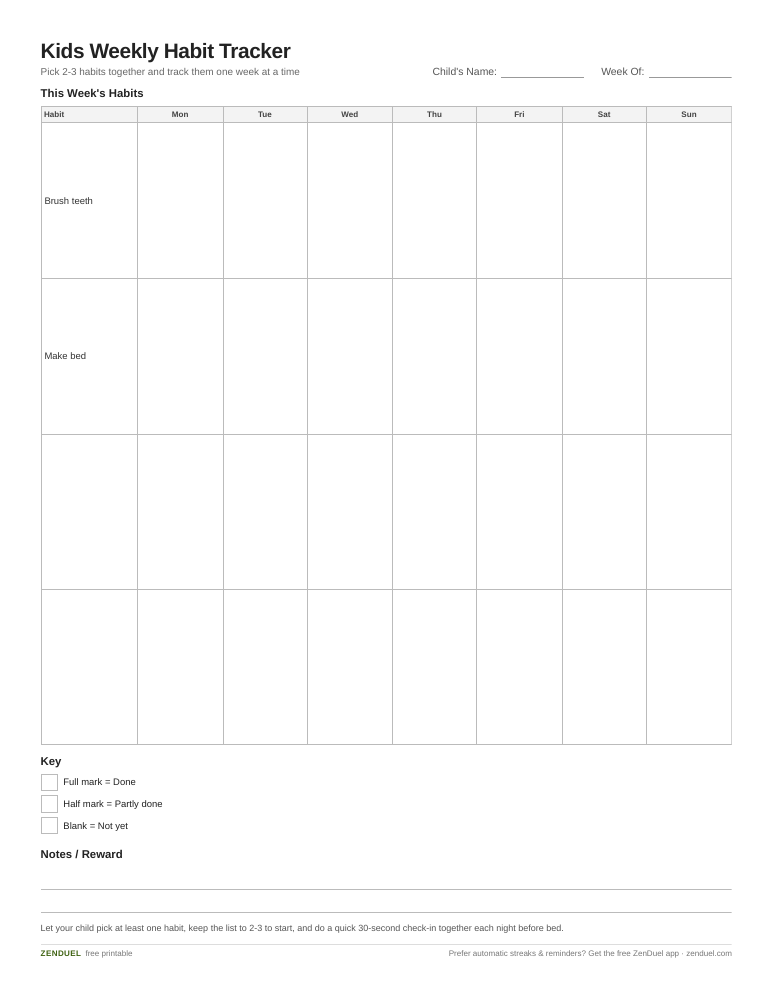
Our own printable — free, no sign-up, no email required. A 7-day grid for up to four habits, a key for full vs. half marks, and a notes line for the week’s reward. US Letter (prints fine on A4).
Quick Answer
A kids habit tracker works best when it’s visible, simple (2-3 habits max to start), and gives the child some say in what’s tracked. For kids under 8-10, a paper chart with stickers or stamps beats an app; for tweens and teens, a shared family app can work if the whole household uses it, not just the kid. Pair every check mark with specific verbal praise, and plan to phase out rewards after a few weeks once the routine runs on its own.
What Actually Counts as a Habit Tracker for Kids
At its core, a kids habit tracker is just a visual record that connects an action to a mark — a sticker, a stamp, a checked box, a filled-in square — placed somewhere the child sees every day. It can be a wall chart, a notebook page, a magnetic board, or a digital checklist. What makes it a habit tracker rather than a one-time chore list is repetition: the same small set of behaviors, tracked daily or weekly, until the mark on the chart stops being the point and the behavior itself becomes automatic.
The format matters less than most parents expect going in. What matters is that the child can look at it and immediately understand what they did and what’s left — no reading a long list, no asking a parent to interpret it.
Step 1: Pick the Right Format for Your Child’s Age
Young kids (roughly ages 2-6) respond best to a physical, tactile chart — a sticker chart, a magnetic chore board, or a marble jar they fill up. These give immediate, visible feedback without adding screen time, which matters for a habit like brushing teeth or getting dressed.
Kids around 6-9 can usually manage a chart tracking 2-3 habits with some parent involvement, like checking boxes together each evening. By tweens and teens, a shared digital tracker or app can work well, especially if it’s something the whole family uses together rather than a tool imposed just on them.
Whatever the format, put it somewhere the family actually passes by every day — the kitchen, a bedroom door, or wherever the household naturally gathers in the morning or evening. A tracker buried in a drawer doesn’t get used.
Habit Ideas Worth Tracking, by Category
Parents often stall out on this step simply because they’re not sure what belongs on the chart. A few reliable categories, mix and match two or three to start:
Self-care and hygiene: brushing teeth, washing hands before meals, getting dressed without reminders, putting on pajamas for bedtime. Chores and responsibility: making the bed, putting toys away, feeding a pet, setting the table, packing their own school bag. School and learning: independent reading time, finishing homework before screen time, practicing an instrument. Health and movement: drinking water, eating a fruit or vegetable at meals, 20-30 minutes of outside play. Behavior and emotional habits: using kind words, one act of kindness a day, a short gratitude note before bed.
A good starting mix is one or two habits your child is already decent at, paired with one that’s genuinely new or needs work. Starting with all-new, all-hard habits is a common reason trackers get abandoned in the first week.
Step 2: Choose Habits Together, Not For Them
Let your child pick at least a couple of the habits themselves, even if they seem minor. A tracker that’s entirely parent-assigned tends to feel like a chore list, not something the kid buys into.
Keep the total list short — two to three habits per child is plenty at the start. You can always add more once the first few are running on autopilot; a tracker with eight boxes to fill every night just becomes another thing to forget.
A Free Printable Layout That Works
If you’d rather not design a chart from scratch, the printable download on this page uses a layout built around exactly what’s described above: a one-page weekly grid, with the seven days of the week (Sun-Sat) as columns across the top and up to four habit rows down the left side, plus a name field and week-of date line at the top so each child gets their own sheet.
Each cell is sized large enough for a sticker or a hand-drawn star, not just a tiny checkbox. A short key row along the bottom lets you define what a full sticker versus a half-mark means, and a small notes line at the very bottom is for the reward or the one thing to remember next week. Print it at standard letter size, tape it somewhere the family walks by daily, and refill with a new sheet each Sunday — that weekly reset is part of why it keeps working past the first month.
Step 3: Set Up Rewards That Fade Out
Rewards help get a habit off the ground, especially for younger kids, but they work best as training wheels rather than a permanent fixture. For kids under about 8, keep the reward window short — a small payoff within a day or two, not a prize that’s weeks away. Longer time horizons don’t mean much to a 5-year-old.
Favor rewards that are about time and attention over things you buy: a walk, a game night, picking the movie. These tend to hold up better over time than material prizes, and they reinforce the habit as something the family does together rather than a transaction.
Plan to loosen the reward system after the first few weeks, once the habit is running without much resistance. The sticker or check mark should eventually become the routine itself, not the reason for doing it. And regardless of age, pair the mark on the chart with specific verbal praise — naming exactly what they did — rather than letting the sticker do all the work.
Paper, Board, or App: Digital Options When They Make Sense
A paper or magnetic chart is usually the right call for younger kids, but for tweens and teens, a shared digital tracker can be worth it — mainly when the whole family uses the same app rather than it being installed just for one kid. Look for a setup with a simple daily checklist, some kind of streak or progress view, and a reward system the child can see progress toward, not just the parent.
The trade-off is screen time: an app adds a device touch-point to a habit that’s often supposed to reduce screen time in the first place (brushing teeth, reading, chores). If that’s a concern, keep the digital tracker for habits that are already screen-adjacent — homework, reading logs, practice time — and leave hygiene and morning-routine habits on paper.
Tips / Common Mistakes
Don’t launch a tracker with more than 2-3 habits per kid — it’s the single most common reason they stop using it. Add habits gradually as earlier ones become automatic.
Don’t let the tracker live somewhere out of sight. A chart in a closet or an app nobody opens might as well not exist; put it where the family already looks every day.
Don’t make it purely a punishment tool for missed days. Trackers that only highlight failure tend to get abandoned faster than ones that focus on streaks and progress.
Don’t set rewards too far in the future for younger kids — a payoff that’s two weeks away doesn’t motivate a 5-year-old the way one that’s tomorrow does.
Don’t skip the check-in. A quick daily moment — even 30 seconds at bedtime — to mark the chart together does more for consistency than the chart’s design ever will.
Photos

kids habit tracker FAQs
What age should kids start using a habit tracker?
Kids as young as 2-3 can start with a very simple one-habit sticker chart. Multi-habit tracking usually works better starting around age 5-6, once a child can understand the connection between the action and the mark on the chart.
Should I use a paper chart or an app for my kid’s habits?
For younger kids, a physical chart (stickers, stamps, a marble jar) tends to work better since it’s tactile and doesn’t add screen time. For tweens and teens, a shared app can work well, especially if parents use it too rather than it feeling like a tool just for the kid.
How many habits should be on a kid’s tracker at once?
Start with 2-3 habits per child. Trying to track too many at once is the most common reason a tracker gets abandoned in the first week — add more habits later, once the first few are running without reminders.
Do I need to keep giving rewards forever?
No. Rewards are most useful in the first few weeks, while a habit is still forming. Once it’s running with little resistance, start loosening the reward system and lean on verbal praise instead — the goal is for the habit to become the routine, not something done only for a prize.
What’s the best format for a habit tracker for kids?
There’s no single best format — it depends on age. A tactile paper chart with stickers works best under age 8-10, since it’s immediate and doesn’t involve a screen. A printed weekly grid works well for a wider age range when parent and child check it in together each evening, and a shared family app can work for tweens and teens if the whole household uses it.
How do I know if a habit tracker is actually working?
The clearest sign is the habit still happening when the chart is temporarily forgotten — a missed day or two without a full relapse. If the habit only happens because of the chart and disappears the moment the sticker stops, it’s worth shortening the habit list or extending the reward phase a bit longer before fading it out.
Skip the Spreadsheet — Track It in ZenDuel
Habit streaks, mood tracking, and accountability duels in one free app — no template maintenance required. Get ZenDuel.
Want a calmer inbox? Subscribe to the free newsletter.
