Paper habit trackers work great for about a month, and then you’re printing a new one. A laminated habit tracker fixes that: print it once, seal it in a laminating pouch, and you’ve got a tracker you can wipe clean and reuse every single month for years.
Table of Contents
Below is a free, ready-to-print habit tracker PDF (grab it in the download box on this page) built specifically for lamination, plus the exact layout, materials, and marker choices that make it hold up without staining or ghosting.

Download the Free Reusable Laminated Habit Tracker
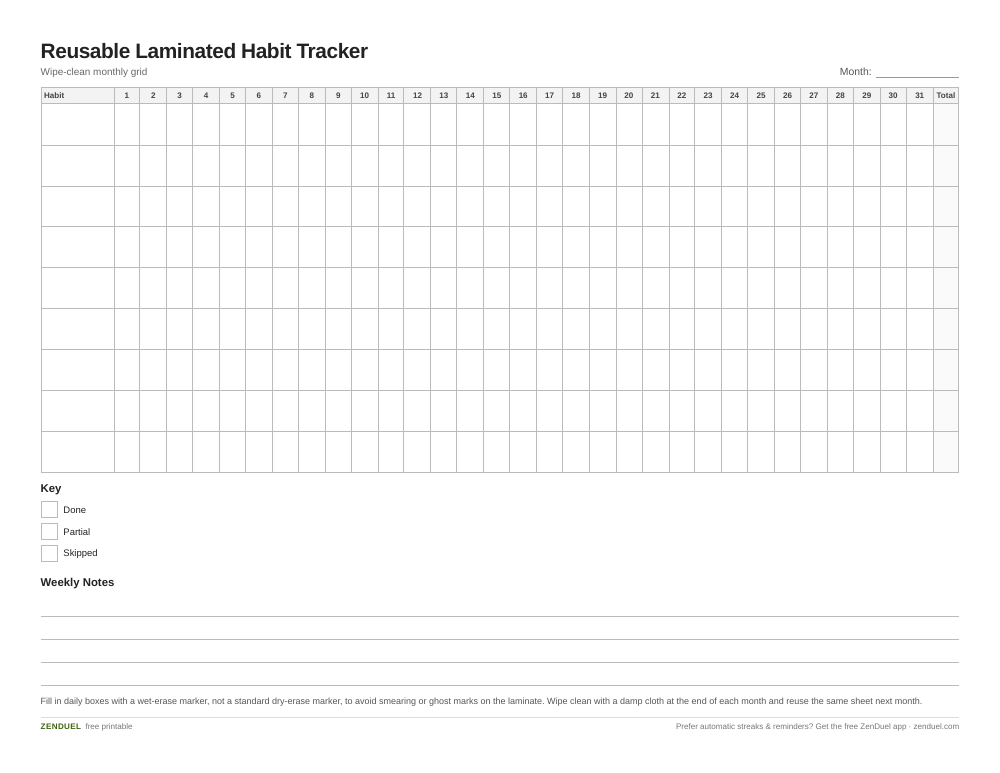
Our own printable — free, no sign-up, no email required. A 31-day grid for up to 9 habits with a monthly total column, a done/partial/skipped key, and a weekly notes strip. US Letter (prints fine on A4).
Quick Answer
Print the free habit tracker PDF on regular paper, seal it in a 5-mil laminating pouch (or have it laminated at an office/print shop), and fill it in with a wet-erase marker rather than a true dry-erase marker. Wipe it clean with a damp cloth at the end of each month and reuse the same sheet indefinitely.
What’s in the printable and how it’s laid out
The PDF is a single letter-size (8.5″ x 11″) page designed to survive repeated erasing. Across the top is a row for the month and a row of 31 numbered day columns. Down the left side is a column of blank habit rows (room for up to 8-10 habits), so you write in your own habits in pencil or marker, then check off each day as you go.
At the bottom there’s a small weekly notes strip and a simple key (a filled box, an X, or a dot system) so you can mark “done,” “partial,” or “skipped” differently if you want more than a yes/no record. Because the grid lines and labels are printed, only the checkmarks need to be erased each month — the structure itself never has to be redrawn.
This layout is intentionally generic (not tied to a specific month or year) so one laminated sheet works for January just as well as it works for December.
How to laminate and set it up
Print the PDF on plain paper at 100% scale (don’t let your printer “fit to page” — that can shrink the grid slightly). If you have a home laminator, use a letter-size pouch rated around 5 mil; that thickness is sturdy enough for a chart that gets handled and erased daily but still fits through most compact home laminators (most are rated up to 5 mil). If you don’t own a laminator, most office supply stores and print/copy shops will laminate a single page for a small fee while you wait.
Once sealed, trim any excess pouch border with scissors, leaving a small margin around the edge so the seal stays intact. Stick it to a fridge, closet door, or desk with a magnet or a bit of removable tape, and you’re set up for the month.
Fill in your habit names first with a permanent marker if you want them to stay put long-term, or with a wet-erase marker if you like swapping habits out periodically. Either way, keep the daily tracking marks to a wet-erase or fine-tip dry-erase marker — not a permanent one.

Tips / Common Mistakes
Use wet-erase (sometimes called “vis-a-vis” style) markers for the daily checkmarks instead of standard dry-erase markers. Laminate film is glossier and less porous than a real whiteboard, so dry-erase ink can smear more easily or leave faint “ghost” marks behind over time; wet-erase ink wipes off cleanly with a damp cloth or a little glass cleaner.
Erase soon after the month ends rather than letting marks sit for weeks — the longer ink stays on the laminate, the more likely it is to leave a shadow.
Avoid bold/chisel-tip markers for the small daily boxes; a fine or ultra-fine tip keeps marks inside each day’s cell and makes the sheet easier to read at a glance.
If a smudge or stain does build up, a dry paper towel with a drop of rubbing alcohol or glass cleaner removes most residue without damaging the laminate.
Don’t laminate if you plan to write permanent habit names and never change them — in that case, skip lamination for the habit-name column area or just rewrite those in pencil before sealing, since anything printed or written before lamination becomes permanent.
Explore more: more habit-building tools and comparisons.
Laminated habit tracker FAQs
Can I use a regular dry-erase marker on a laminated habit tracker?
You can, but wet-erase (vis-a-vis style) markers are a safer choice for laminate — they’re less prone to smearing and leaving ghost marks than standard dry-erase markers, and they still wipe off easily with a damp cloth.
What laminating pouch thickness should I use?
A 5-mil letter-size pouch is a good match for a habit tracker that gets erased and handled often — it’s sturdier than 3-mil without exceeding what most home laminators can run through.
Do I need a laminator to use this tracker?
No. You can laminate it yourself with a home laminator, or take the printed PDF to an office supply store or print shop and have a single page laminated there.
How do I remove old marks without damaging the sheet?
A damp cloth handles routine wipe-downs. For stubborn marks or buildup, a little glass cleaner or rubbing alcohol on a paper towel removes residue without harming the laminate.
Can I track more than one month at a time?
The tracker is month-agnostic by design — just erase last month’s marks and start fresh, so one laminated sheet covers every month going forward.
Skip the Spreadsheet — Track It in ZenDuel
Habit streaks, mood tracking, and accountability duels in one free app — no template maintenance required. Get ZenDuel.
Want a calmer inbox? Subscribe to the free newsletter.
Photo by Yaroslav Shuraev on Pexels.