A mood tracker is one of the most popular bullet journal spreads because it turns a vague feeling like “this month was rough” into something you can actually see. Instead of guessing how you’ve been doing, you get a visual record: a grid of color or symbol that shows patterns across weeks and months.
Table of Contents
You don’t need fancy art skills or a stack of pens to build one. This guide walks through the layout, the mood key, and the daily habit of filling it in — plus a free printable version you can use right away if you’d rather skip the ruler and grid-drawing.
Download the Free Mood Tracker Bullet Journal Spread
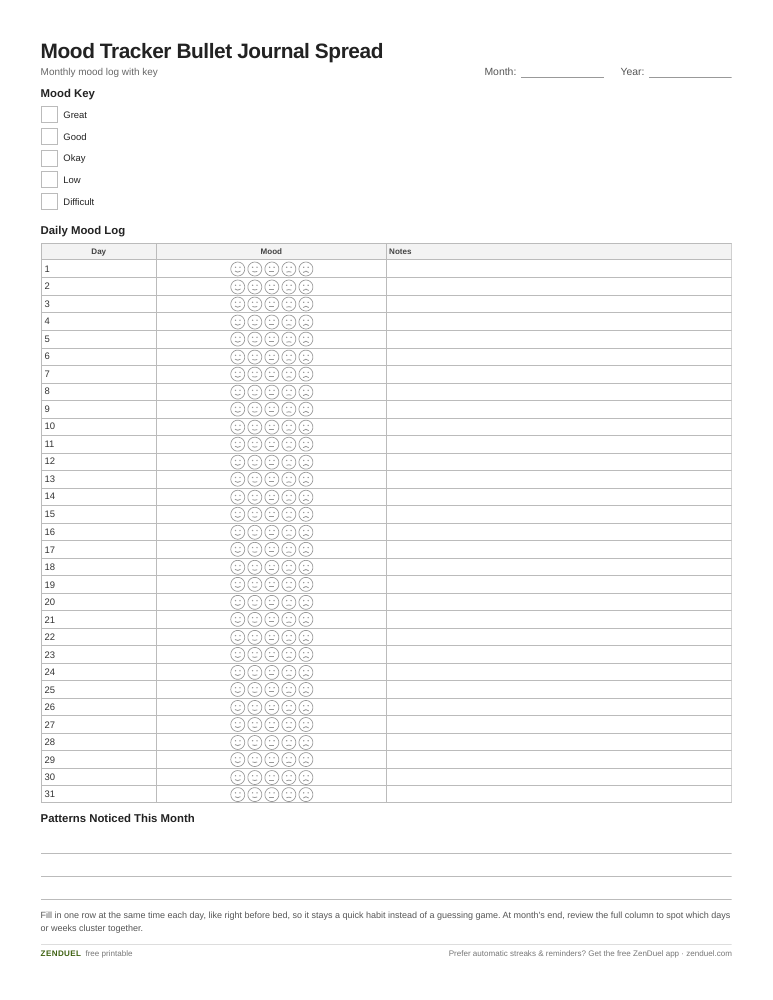
Our own printable — free, no sign-up, no email required. A boxed mood key, a numbered day column for the month, and a daily mood-and-notes grid. US Letter (prints fine on A4).
Quick Answer
Draw (or print) a grid with one row or column per day of the month, create a color-coded mood key with 4-6 mood categories, and fill in one cell per day using the matching color or symbol. Review the full grid at month’s end to spot patterns.
Step-by-Step: Building the Grid
Start with the header. Across the top of the page, write the month and year, and leave a small strip of space for a title like “Mood Tracker.” If you’re working in a dotted or gridded notebook, use the existing dots as a ruler guide so your rows stay even.
Lay out the day column. Down the left edge, number the rows 1 through 31 (or however many days are in that month) — this is the backbone of the spread and the part most people get wrong by guessing at spacing instead of counting dots first.
Build the mood key before you touch the grid. Pick 4 to 6 mood categories that actually describe your range of days — something like Great, Good, Okay, Low, and Difficult works for most people. Assign each one a distinct color (colored pencils, markers, or highlighters all work) or a simple symbol if you’re keeping it black-and-white. Box the key off in a corner so it’s easy to reference while filling in the grid.
Choose your fill style. The two most common approaches are a single-column grid where each day gets one colored square, or a “pixel” grid of small boxes (similar to a Year in Pixels spread, but scoped to one month) where you color in one box per day. Both work — the single-column version is faster to fill in, while the pixel grid feels more like a piece of art by month’s end.
Fill it in daily. At the end of each day, pick the mood category that fits best and color or mark that day’s cell. Keep it quick — a 10-second habit is one you’ll actually stick with. If a day doesn’t fit neatly into one category, just pick the closest one rather than overthinking it.
Layout Options and Customization
A corner mood tracker is the space-saving option: shrink the grid down and tuck it into a corner of your existing monthly spread next to your calendar or habit tracker, so you’re not dedicating a full page to it.
A full-page spread gives you more room to get creative — some people add a themed border (seasonal, holiday, or whatever matches that month), a small notes section for “what influenced this mood,” or extra columns for tracking sleep or energy alongside mood.
Washi tape or stickers can stand in for hand-drawn color if you want a tidier look without freehand coloring. The structure (day rows, mood key, daily fill-in) stays the same no matter how you decorate it.
If you’d rather not draw the grid from scratch every month, use the free printable mood tracker template included with this post. It follows the layout above — a numbered day column, a boxed mood key, and a fill-in grid — so you can drop it straight into your journal or print a fresh copy each month.
Tips and Common Mistakes
Don’t use more than 5-6 mood categories. More than that and you’ll hesitate every day trying to pick the “right” one, which is exactly the friction that kills the habit.
Pick colors you can tell apart at a glance, especially if you’re using similar shades (like two different blues). High contrast between categories makes the end-of-month pattern easier to read.
Fill it in at a consistent time, like right before bed, so it doesn’t turn into a once-a-week guessing game about what each previous day felt like.
Resist the urge to make it perfect. A mood tracker is a data log, not a showcase page — a slightly messy grid you actually finish beats a beautifully drawn one you abandon after a week.
Review it at the end of the month. The real value isn’t the grid itself, it’s looking back and noticing what days, weeks, or events cluster around your lower-mood entries.
Explore more: more mental health tools and trackers.
Mood tracker bullet journal spread FAQs
How many colors should I use in a mood tracker key?
Stick to 4-6 categories. That’s enough range to capture real variation in your days without making the daily fill-in feel like a hard decision.
What’s the difference between a mood tracker and a Year in Pixels spread?
They use the same grid-and-color concept, but a mood tracker is usually scoped to one month and lives inside your regular bullet journal pages, while a Year in Pixels tracker is a single spread covering all 12 months at once.
Do I need a dotted notebook to make a mood tracker?
No. Dotted or gridded pages make it easier to keep rows and boxes even, but a plain or lined notebook works fine too — or you can skip freehand drawing entirely and use a printable grid.
What if I forget to fill it in for a few days?
Just pick up where you left off, or fill in your best recollection of the missed days. The goal is a useful pattern over time, not a perfect unbroken streak.
Skip the Spreadsheet — Track It in ZenDuel
Habit streaks, mood tracking, and accountability duels in one free app — no template maintenance required. Get ZenDuel.
Want a calmer inbox? Subscribe to the free newsletter.
Photo: Nea.salo / CC BY-SA 4.0, via Wikimedia Commons.