Meal prep only works if you actually do it every week — and the easiest way to make that happen is to track it like any other habit. A spreadsheet beats a sticky note because it holds your weekly plan, your prep-day checklist, and your streak history in one place you can glance at in seconds.
Table of Contents
This guide walks through a free Excel meal prep habit tracker template you can download and start using today, plus how to set it up, what to track, and how to actually stick with it past the first couple of weeks.
Download the Free Meal Prep Habit Tracker
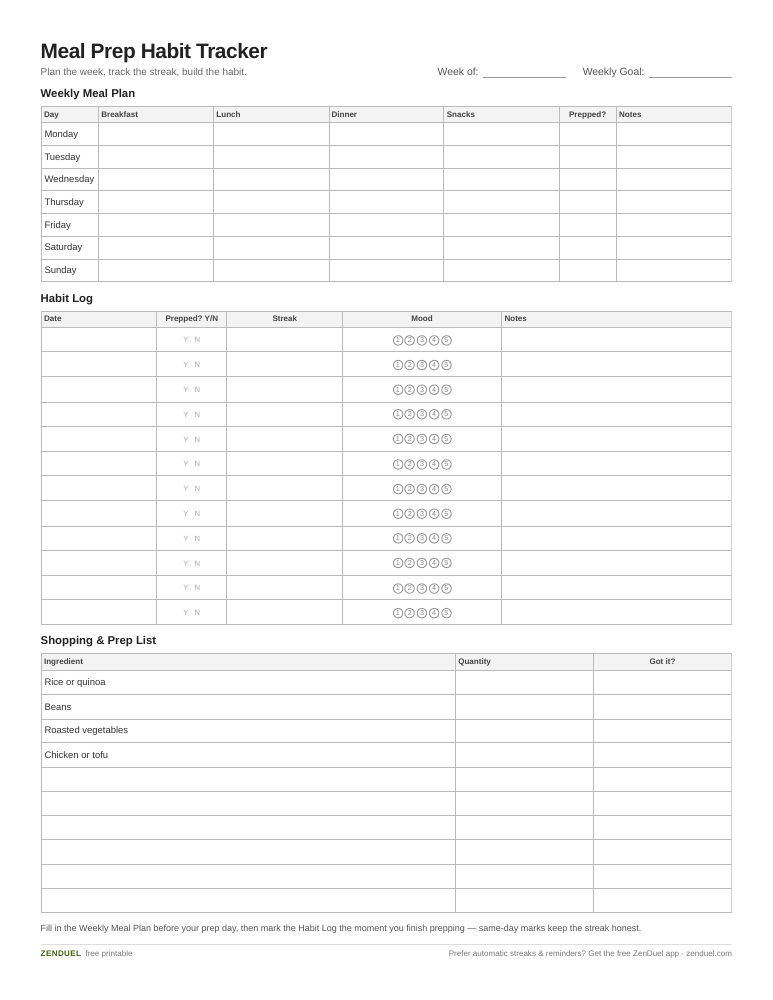
Our own template — free, no sign-up, no email required. A 7-day meal plan grid, a 12-row habit and streak log, and a shared shopping/prep checklist. US Letter (prints fine on A4). For Google Sheets, upload the .xlsx via File → Import.
Meal Prep Habit Tracker (Excel / Google Sheets) Meal Prep Habit Tracker (PDF)
Quick Answer
Use a two-tab Excel tracker: one tab for your weekly meal plan (what you’re eating each day) and one tab for your habit log (did you prep, and how long is your streak). Download the free template above, pick one recurring prep day, and fill in both tabs every week — stick with it consistently for a couple of months and it starts to feel automatic rather than like a task you have to remember.
What’s in the Template
The attached Excel file is split into two simple sheets so planning and habit-tracking don’t get tangled together.
Weekly Meal Plan tab: a row for each day of the week (Monday through Sunday) with columns for Breakfast, Lunch, Dinner, and Snacks, plus a ‘Prepped?’ checkbox column and a Notes column for things like ‘double batch for freezer’ or substitutions. This is where you write down the actual meals before the week starts.
Habit Log tab: one row per date going down the page, with columns for Did I prep today? (Y/N), Current Streak (a simple formula that counts consecutive Y’s), Weekly Goal (e.g., prep 3x this week), and Energy/Mood rating (1-5) so you can see whether prepping actually correlates with feeling better during the week. A small summary box at the top tallies your longest streak and your prep rate for the month.
A third, optional tab is a running Shopping & Prep List — ingredient, quantity, and a checkbox — so your Sunday grocery run and your Sunday prep session pull from the same list instead of two separate notes.
How to Set It Up and Use It
Pick one recurring prep day and put it on your calendar like an appointment — Sunday afternoon or Monday evening are the most common choices because they bookend the work week. Consistency matters more than which day you pick.
Before that day arrives, fill in the Weekly Meal Plan tab. Lean on a handful of multi-purpose staples — rice, quinoa, beans, roasted vegetables, grilled chicken or tofu — that you can cook in bulk once and mix into different meals all week with different sauces or spices. This cuts your actual cooking time down and makes the plan easier to stick to.
On prep day, check off each meal as you portion it out, then mark the Habit Log ‘Y’ for that date the moment you finish. Marking it immediately, rather than at the end of the week, is what keeps the streak column meaningful and keeps you honest.
At the end of each week, glance at the streak and prep-rate numbers on the Habit Log tab. If you missed a week, don’t delete the row — leave the ‘N’ and start the next streak fresh. The visible gap is useful information, not a failure to hide.

Tips / Common Mistakes
Start smaller than you think you need to. Trying to prep every single meal for seven days in your first week is a common way to burn out fast; many people start with just prepping lunches or dinners for three or four days and expand from there once it’s routine.
Don’t let the tracker become its own chore. Keep entries to a checkbox and a one-line note — if filling in the sheet takes longer than two minutes, you’ll stop doing it.
Batch your proteins and grains separately from your flavors. Cooking a plain base (rice, chicken, roasted veggies) and adding different sauces or spices per meal keeps the week from feeling repetitive, which is the top reason people abandon meal prep.
Keep your grocery list and prep list in the same file. Re-typing the same ingredients into a separate shopping app is friction you don’t need — the template’s Shopping & Prep List tab is there so one list covers both.
Review the Habit Log monthly, not just weekly. A single skipped week is normal; a pattern of skipped weeks on the same day of the month usually points to a scheduling conflict worth fixing (recurring work travel, a standing Sunday commitment, etc.).
Explore more: more free habit tracker templates.
Meal Prep Habit Tracker FAQs
Is this Excel template really free?
Yes. It’s a free download with no sign-up, and it also works in Google Sheets if you prefer a browser-based version.
How many meals should I prep to start?
Start with just one meal type — lunches or dinners — for three to four days a week. Expand to a full week once that smaller habit feels manageable; it generally takes a sustained stretch of consistent repetition, often a couple of months, before prepping stops feeling like something you have to remember.
What if I miss a day in my streak?
Mark it ‘N’ and move on. The streak formula will simply restart counting from your next ‘Y’ — the goal is an honest record, not an unbroken perfect streak.
Can I use this tracker for a specific diet plan?
Yes. The Weekly Meal Plan tab doesn’t assume any particular diet — just fill in the Breakfast/Lunch/Dinner/Snack cells with whatever meals fit your plan, whether that’s calorie counting, macro tracking, or simply eating more home-cooked food.
Skip the Spreadsheet — Track It in ZenDuel
Habit streaks, mood tracking, and accountability duels in one free app — no template maintenance required. Get ZenDuel.
Want a calmer inbox? Subscribe to the free newsletter.
Photo by Ella Olsson on Unsplash.
