A sleep tracker is one of the simplest spreads to add to a bullet journal, and one of the most useful. Instead of relying on memory or a wearable app, you log bedtime, wake time, and how you actually felt the next day — right next to your other habit and mood trackers, where patterns are easy to spot.
Table of Contents
Below are five sleep tracker spread ideas you can copy into any notebook, a walkthrough for setting one up from scratch, and the free printable layout attached to this post if you’d rather skip the drawing and start logging tonight.
Download the Free Sleep Tracker Monthly Log
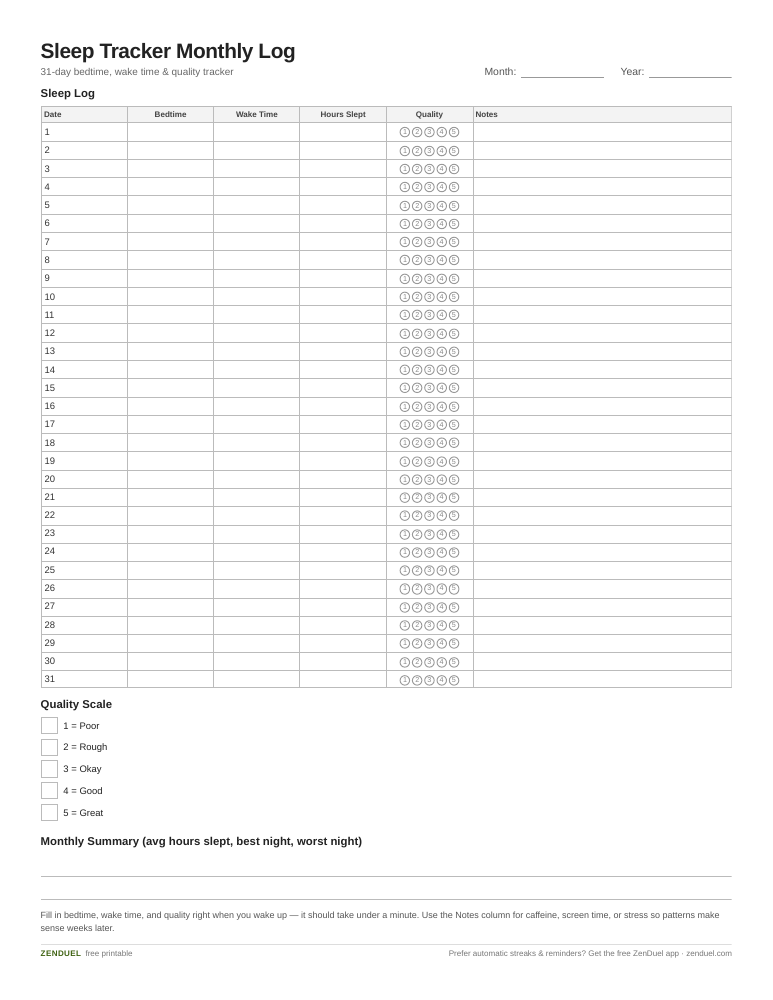
Our own printable — free, no sign-up, no email required. A 31-row monthly grid for bedtime, wake time, hours slept, and a 1-5 quality rating, with a notes column and summary line. US Letter (prints fine on A4).
Quick Answer
The simplest sleep tracker bullet journal spread is a monthly grid: one row per day of the month, with columns for bedtime, wake time, total hours slept, and a quick quality rating. Add a notes column for things like caffeine, screen time, or stress, and you have everything you need to spot patterns within a few weeks.
5 Sleep Tracker Spread Layouts to Try
Monthly grid tracker: a full-page table with one row per date and columns for bedtime, wake time, hours slept, and a 1-5 quality score. This is the easiest layout to maintain daily and the one the printable below is built around.
Weekly circle or dot tracker: instead of a table, draw seven small circles (one per day) and shade in a portion of each circle to represent hours slept, similar to a water-intake tracker. It’s quick to fill in and gives an at-a-glance visual for the week.
Habit + sleep combo tracker: add a ‘sleep’ row to your existing monthly habit tracker grid, using color-coded boxes (green for 7+ hours, yellow for 5-6, red for under 5) instead of separate times. Good if you already track habits and don’t want a dedicated page.
Mood-and-sleep correlation spread: log sleep hours and next-day mood side by side, either as two bar rows or two line graphs stacked on the same page. Over a month this makes it obvious whether poor sleep is dragging down your mood or energy.
Minimalist bar graph tracker: a single vertical bar chart with one bar per day, height representing hours slept, and a horizontal line marking your target (e.g., 8 hours). This is the fastest to draw by hand and easiest to scan for trends.
The Free Printable Sleep Tracker Layout
The printable attached to this post follows the monthly grid format so you can start using it without drawing anything. Across the top it has a title bar for the month and year, followed by a 31-row table — one row per day of the month, each row pre-numbered 1 through 31.
The table has six columns: Date (pre-filled), Bedtime, Wake Time, Hours Slept, Quality (a row of five small circles or boxes to mark 1-5), and Notes (a wide blank column for caffeine, screen time, stress, or anything else worth remembering). Column widths are sized so Bedtime, Wake Time, and Hours Slept fit neat handwritten entries, while Notes gets the most room since it’s the field people actually want to write in.
At the bottom of the page there’s a small legend area to define your own quality scale or color key (for example, what a filled-in vs. empty quality box means), plus a short summary line for your average hours slept and best/worst night of the month. Print one page per month, or print several at once if you like keeping trackers in a binder alongside your notebook.
How to Set Up Your Sleep Tracker Spread
Pick a timeframe first: weekly spreads are easier to start and great for testing a new bedtime routine, while monthly spreads are better once you want to see longer trends like how sleep shifts across the month.
Decide which metrics matter to you. At minimum, track bedtime, wake time, and total hours slept. Many people also add a sleep quality rating (1-5), and a short notes field for anything that might explain a bad night — late caffeine, screen time, stress, alcohol, or a late workout.
Choose a simple visual system you’ll actually keep up with: a table you fill in with numbers, a bar or line graph you shade in, or a dot/circle system you color in partially. The best layout is the one that takes under a minute to update each morning.
Add a key or legend if you’re using color coding, so the spread still makes sense weeks later. Then review it at the end of each week or month — look for your worst and best nights and see what was different about them.
Tips / Common Mistakes
Keep the daily entry fast. If filling in the tracker takes more than a minute, you’ll skip it on busy mornings and end up with gaps that make patterns harder to see.
Don’t just log hours — log context too. A single notes column for caffeine, screen time, or stress is often what explains why two nights with the same hours felt completely different.
Review on a schedule. A tracker only helps if you actually look back at it; set a recurring weekly or monthly review in your journal to scan for patterns instead of letting the page just fill up.
Match the spread to your handwriting speed. If hand-drawing a grid every month feels like a chore, that’s exactly when the printable layout earns its place — use it as-is or trace it into your notebook.
Explore more: more habit tracking ideas.
Sleep tracker bullet journal spreads FAQs
What should a sleep tracker bullet journal spread include?
At minimum: bedtime, wake time, and total hours slept. Most people also add a quality rating (1-5) and a short notes column for factors like caffeine, screen time, or stress that might explain a good or bad night.
Should I use a weekly or monthly sleep tracker layout?
Weekly layouts are easier to start and good for testing a new routine over a few nights. Monthly layouts take more commitment but make longer-term patterns, like sleep dips around certain weeks, much easier to spot.
Is there a free printable sleep tracker layout I can use?
Yes — this post includes a free printable sleep tracker grid you can download and use right away: a 31-row monthly table with columns for bedtime, wake time, hours slept, and a quality rating, plus a notes column for context like caffeine or stress.
Skip the Spreadsheet — Track It in ZenDuel
Habit streaks, mood tracking, and accountability duels in one free app — no template maintenance required. Get ZenDuel.
Want a calmer inbox? Subscribe to the free newsletter.
Photo: Nea.salo / CC BY-SA 4.0, via Wikimedia Commons.