If you carry a Hobonichi Techo, Hobonichi Cousin, or any standard A6 planner, you already know the struggle: most habit trackers you find online are sized for a letter-size binder or a bullet journal, not a pocket-size planner. Trim one down by hand and the margins never line up, the boxes get too small to check off, and the whole thing looks sloppy tucked next to your daily log.
Table of Contents
This guide walks through how to use a free printable habit tracker that’s sized correctly for Hobonichi and A6 planners from the start, plus how to trim, punch, and insert it so it sits flush with your other pages. You’ll also get a layout breakdown so you know exactly what you’re printing before you cut anything.
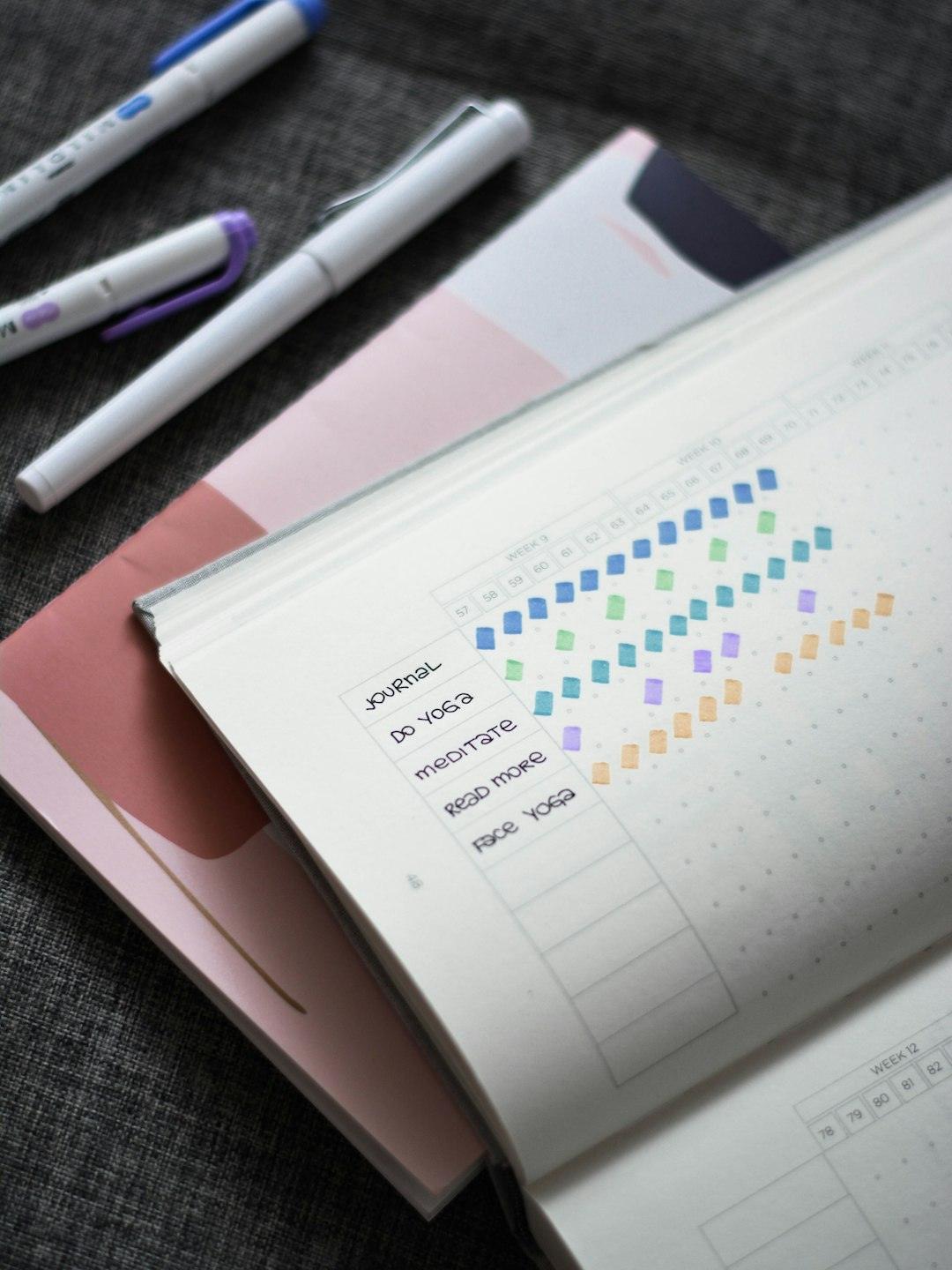
Download the Free Habit Tracker for Hobonichi & A6 Planners
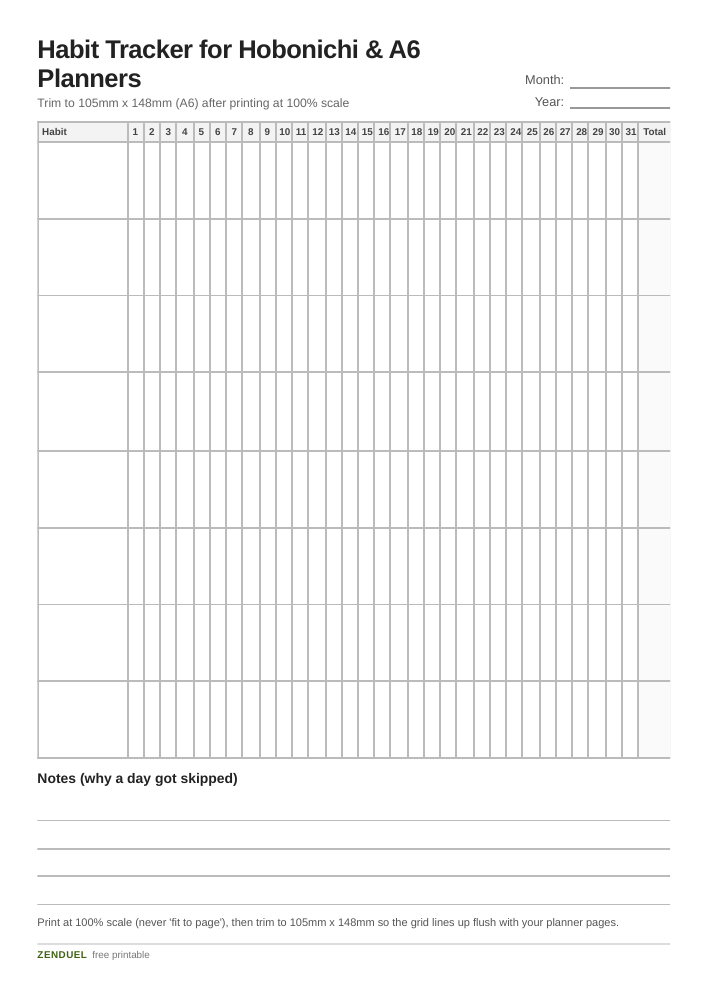
Our own printable — free, no sign-up, no email required. Eight habit rows, 31 daily check-off columns, a streak total column, and a notes strip for skipped days. A6 / Hobonichi.
Quick Answer
Grab the free printable habit tracker attached to this post, print it at 100% scale (no ‘fit to page’ scaling), and trim it to A6 size — 105mm x 148mm, or about 4.1 x 5.8 inches. It drops straight into a Hobonichi Techo, a Hobonichi Cousin (which uses A5 but accepts A6 inserts fine since A6 is exactly half an A5 sheet), or any A6-ring planner or A6-size Traveler’s Notebook. One important exception: A6 is not the same size as a Passport-size Traveler’s Notebook. Passport Size pages run noticeably smaller on both dimensions than A6, so this tracker won’t drop into a Passport-size notebook without resizing first — see the sizing note below before you trim.
How to Print and Trim It to Fit
Start by confirming your printer settings before you print a single copy. In the print dialog, set paper size to A6 if your printer supports it directly, or print on A4/Letter and set scale to 100% (never ‘shrink to fit’ or ‘fit to printable area’) — those auto-scale options will shrink the grid just enough that your margins stop lining up with planner holes or edges.
If your printer can’t feed A6 paper directly, print the tracker on a full A4 or US Letter sheet and trim it down. Use a paper cutter or craft knife with a ruler rather than scissors for a straight edge — a 1-2mm wobble is noticeable once the page is sitting against the clean edge of a Hobonichi page.
For Hobonichi Techo (A6) and Hobonichi Cousin (A5), the tracker is designed at A6 size either way: in the Techo it fills a full page, and in the Cousin it sits as a half-page insert you can tape, glue, or tuck into a pocket page. For A6 ring planners, punch it to match your existing hole pattern — the tracker’s margins leave enough white space on the binding edge for a standard 6-hole layout.
One size note worth flagging: this tracker is cut to true A6 (105mm x 148mm), which fits A6-size Traveler’s Notebooks directly. It is a different, larger format than a Passport-size Traveler’s Notebook — Passport Size refill pages run about 124mm x 89mm, smaller than A6 on both the height and width, not just one edge. That means you can’t just trim an A6 sheet down to the Passport footprint and expect the grid to still look right; the margins and check-off columns are positioned for the bigger A6 page. If you use a Passport-size notebook, scale the file down proportionally in your print dialog before trimming, or keep it as a loose flat insert tucked between pages instead of binding it in at full A6 size.
What’s in the Layout
The tracker uses a simple grid built to stay legible at A6 scale, where space is tight: a header row for the month and year, a column of up to 10 habit-name slots down the left side, and 31 small check-off columns across the top for each day of the month. Each cell is sized so you can mark it with a dot, X, or color-fill using a fine-tip pen (0.3-0.5mm) without the ink bleeding into the next box.
Below the grid is a short notes strip — a single line per week or a small open box — for jotting why a day got skipped, which matters more for building a habit than the checkmark itself. There’s also a thin streak-count column on the right edge of each habit row, so you can see your current run without recounting boxes.
Because the whole layout is built at true A6 dimensions rather than scaled down from a bigger template, the text and gridlines stay readable instead of turning into a blurry mess of tiny boxes — a common problem when people shrink a letter-size tracker down to pocket size in a photocopier or print dialog.
Tips and Common Mistakes
Don’t print on your planner’s actual paper weight by accident — Hobonichi’s Tomoe River paper is thin and meant for ink, not a home printer’s toner or heavy inkjet saturation; print the tracker on your own printer paper and insert it as a separate sheet rather than running planner refills through your printer.
Track fewer habits than you think you need. The A6 format fits comfortably up to about 8-10 habits per month before rows get cramped; if you’re tracking more than that, split them across two inserts (e.g., one for morning routines, one for health habits) rather than squeezing everything onto one grid.
Pick one marking system and stick with it for the whole month — a filled dot for ‘done,’ an X for ‘skipped on purpose,’ and a blank for ‘forgot.’ Mixing symbols between pages makes it harder to spot patterns when you flip back weeks later.
If you’re using the tracker inside a Hobonichi Cousin, match the trim to the actual page block rather than the cover size — Cousin pages measure A5, but a correctly-sized A6 tracker glued or taped to the inner margin leaves a clean strip of the facing page visible, which works well as a mini dashboard next to your daily log.
Don’t assume A6 and Passport size are the same just because they’re both described as ‘pocket’ formats for a Traveler’s Notebook. Passport Size pages (about 124mm x 89mm) are meaningfully smaller than A6 (105mm x 148mm) on both dimensions, so an A6 sheet trimmed straight down to Passport size will still cut off part of the grid — resize proportionally first instead.
Explore more: more habit-building guides and trackers.
Free Printable Habit Tracker for Hobonichi and A6 Planners FAQs
Will an A6 habit tracker fit a Hobonichi Techo exactly?
Yes. The Hobonichi Techo (original, not Cousin) is A6 size, so a tracker printed and trimmed to 105mm x 148mm fits as a direct page-for-page insert.
Can I use this tracker in a Hobonichi Cousin, since that’s A5?
Yes — A6 is exactly half of an A5 sheet, so the tracker works as a half-page insert in the Cousin. Tape or glue it along one edge, or slide it into a pocket page if your Cousin cover has one.
Does this A6 tracker fit a Passport-size Traveler’s Notebook?
Not without resizing. A6 (105mm x 148mm) is larger than a Passport-size notebook’s refill pages (about 124mm x 89mm) on both height and width, so trimming an A6 print straight down to Passport dimensions will cut into the grid. Scale the file down proportionally in your print dialog first, or use an A6-size Traveler’s Notebook instead, where the tracker fits directly without resizing.
What paper should I print on for the best result?
A standard printer paper (20-24lb / 75-90gsm) works fine for most pens. If you plan to use brush pens or heavily saturated markers, a slightly heavier cardstock (around 100-120gsm) will resist ghosting through to the back.
How many habits can I realistically track on one A6 sheet?
About 8-10 habits per month is the practical limit before the rows get too narrow to check off comfortably. For more habits, print a second sheet and split them by category.
Skip the Spreadsheet — Track It in ZenDuel
Habit streaks, mood tracking, and accountability duels in one free app — no template maintenance required. Get ZenDuel.
Want a calmer inbox? Subscribe to the free newsletter.
Photo by Prophsee Journals on Unsplash.