A budget only works if you actually look at it, and a savings goal only happens if you track the small deposits that build it. A budget and saving habit tracker puts both jobs on one page: where your money is supposed to go each month, and whether you’re actually setting cash aside on the schedule you planned.
Table of Contents
Below is how to set one up, how to use it day to day, and the exact layout of the printable we’ve built for this — a monthly budget grid paired with a weekly saving streak tracker, sized to print at home and small enough to keep in a planner or stick on the fridge.
Download the Free Budget and Saving Habit Tracker
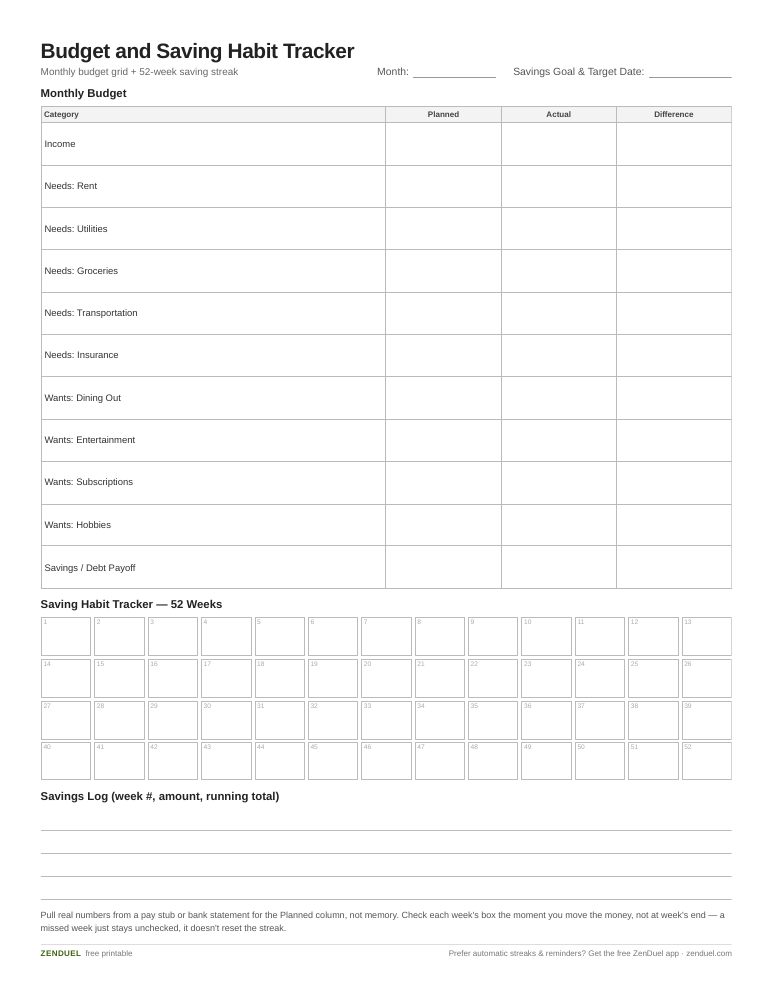
Our own printable — free, no sign-up, no email required. A monthly budget grid with Planned, Actual, and Difference columns, paired with a 52-week saving streak tracker and a goal box. US Letter (prints fine on A4).
Quick Answer
A budget and saving habit tracker is a one-page printable that combines a simple income-and-expense budget with a weekly or monthly checklist for your savings goal. You fill in your planned numbers once, then check off or log actual spending and savings each week to see, at a glance, whether you’re on track.
What’s on the Tracker (Layout and Sections)
The printable is built in two halves so you can budget and track saving habits without juggling two separate sheets. The top half is the monthly budget grid: a row for total income, then grouped rows for needs (rent, utilities, groceries, transportation, insurance), wants (dining out, entertainment, subscriptions, hobbies), and savings/debt payoff. Each row has three columns — Planned, Actual, and Difference — so you can see immediately where you overspent or came in under.
A common starting point for the Planned column is the 50/30/20 split: roughly 50% of take-home pay to needs, 30% to wants, and 20% to savings and extra debt payments. It’s just a starting ratio, not a rule you have to follow exactly — adjust the percentages to fit your actual income and cost of living, then fill in the Planned column with real dollar amounts for your situation.
The bottom half is the saving habit tracker: a grid of 52 small boxes (one per week) or 12 larger boxes (one per month), depending on which version you print. Next to each box is a blank line for the amount you’re saving that period, plus a running total column so you can watch your balance grow without doing mental math. There’s also a small ‘goal’ box at the top where you write your target amount and target date, so the whole tracker stays pointed at one number.
How to Fill It In and Build the Habit
Start by writing your savings goal and deadline in the goal box — an emergency fund amount, a trip, a down payment, whatever it is. Then fill in the Planned column of the budget grid using your actual monthly take-home pay, not an estimate from memory; pull up your last pay stub or bank statement so the numbers are real.
Each week, log your actual spending in the Actual column for any category that changes often (groceries, dining out, gas), and update the Difference column so you can see if you’re trending over or under. You don’t need to update every line every week — fixed costs like rent or a subscription only need checking once a month.
For the saving habit side, pick one method and stick to it for the full tracker. A flat amount every week (say $25) is the simplest and easiest to automate with a bank transfer. A step-up method like the 52-week money challenge has you save an amount that matches the week number — $1 in week one, $2 in week two, up to $52 in the final week — which starts small and ramps up as the habit sticks. Either way, check the box the moment you make the transfer, not at the end of the week, so the tracker reflects what actually happened rather than what you intended.
Keep the tracker somewhere you’ll see it — taped inside a planner, on the fridge, or next to where you pay bills — since a tracker that lives in a drawer doesn’t change behavior.
Tips and Common Mistakes
Don’t make the Planned column aspirational. If you consistently write numbers you know you won’t hit, the Difference column stops meaning anything and you’ll stop trusting the sheet. Set numbers you can actually live on for a month, then adjust next month based on what you learn.
Don’t skip weeks when you miss a saving deposit — just leave the box unchecked and keep going the following week rather than abandoning the tracker. A missed week doesn’t break the habit; starting over from scratch every time one slips does.
Round numbers when it helps you keep up. Tracking saving habits works better when logging takes ten seconds, so write $40 instead of $39.72 if exact-to-the-penny tracking is making you skip entries.
Pair the printable with whatever you already use for the actual transfers — a separate savings account, a round-up app, or a recurring automatic transfer. The tracker’s job is to make the habit visible, not to replace the account that’s actually holding the money.
Explore more: more habit-building tools and trackers.
Budget and Saving Habit Tracker FAQs
Is this tracker a weekly or monthly format?
The printable includes both: a monthly budget grid for income and expenses, and a saving habit section you can use weekly (52 boxes) or monthly (12 boxes), whichever matches how often you want to log progress.
Do I need to follow the 50/30/20 rule to use this tracker?
No. The 50/30/20 split (50% needs, 30% wants, 20% savings/debt) is just a common starting ratio. Fill the Planned column with whatever percentages or dollar amounts actually fit your income and expenses.
What’s the best way to build a saving habit with this tracker?
Pick one consistent method — a flat weekly amount or a step-up approach like the 52-week money challenge — and check the box only after you’ve actually moved the money, so the tracker reflects real progress rather than intentions.
Can I use this tracker if my income changes month to month?
Yes. Update the Planned column at the start of each new month using your actual expected income for that month rather than reusing last month’s numbers, which matters most if you’re paid irregularly or do freelance work.
Skip the Spreadsheet — Track It in ZenDuel
Habit streaks, mood tracking, and accountability duels in one free app — no template maintenance required. Get ZenDuel.
Want a calmer inbox? Subscribe to the free newsletter.
Photo by Renáta-Adrienn on Unsplash.
