Keeping a pet healthy comes down to a handful of small routines repeated every single day: feeding on schedule, getting outside for exercise, taking medication on time, and staying current on grooming and vet visits. The problem isn’t knowing what to do — it’s remembering who did it, and when, especially in a multi-person household or when a pet sitter is involved.
Table of Contents
This guide walks through a free Pet Care Routine Tracker template built for Google Sheets (it also opens fine in Excel) that turns those routines into a simple daily checklist. Grab the download below, then use this guide to set it up and customize it for your pet in a couple of minutes.

Download the Free Pet Care Routine Tracker
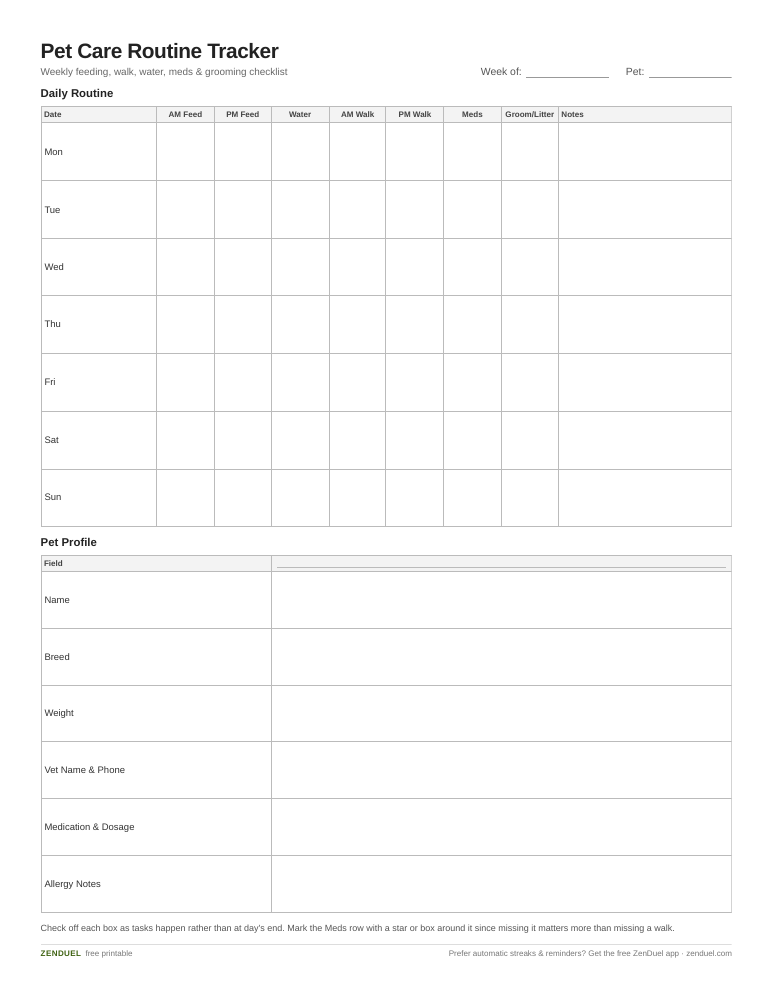
Our own template — free, no sign-up, no email required. A 7-day grid with feeding, water, walk, meds and grooming checkboxes plus a notes column, and a pet profile block for quick reference. US Letter (prints fine on A4). For Google Sheets, upload the .xlsx via File → Import.
Pet Care Routine Tracker (Excel / Google Sheets) Pet Care Routine Tracker (PDF)
Quick Answer
Use a Google Sheets tracker with one row per day and columns for each recurring task (feeding times, walks, meds, water, litter/cage cleaning, grooming). Check off tasks as they happen using Sheets’ built-in checkboxes, and use conditional formatting to instantly see which days or tasks were missed.
What’s in the Template
The attached file is laid out as a weekly grid so one tab covers seven days at a glance. Column A lists the date and day of the week. The next columns are the daily task slots: Morning Feeding, Evening Feeding, Water Refresh, Morning Walk/Exercise, Evening Walk/Exercise, Medication, and Grooming/Litter or Cage Cleaning — each one a checkbox cell you tap to mark done.
A Notes column runs along the right edge for anything task-specific, like a changed medication dose, a vet callback, or a reaction to new food. Below the weekly grid is a small Pet Profile block (name, breed, weight, vet name and phone, medication name and dosage, allergy notes) so sitters or family members have the key facts without digging through old texts.
A second tab, Monthly Overview, rolls the daily checkboxes into one row per day for the full month, which is useful for spotting patterns — like a dog consistently missing its evening walk on weekdays — that are easy to miss day-to-day.
Because it’s a real spreadsheet (not a flattened PDF form), every column and row is yours to add to: insert a Enrichment/Play column, split feeding into AM/Midday/PM, or add a row for a second pet by duplicating the tab.
How to Set It Up and Use It
Open the file in Google Sheets (File > Make a copy if it opens in preview mode, so it saves to your own Drive). Fill in the Pet Profile block first — it only takes a minute and means the sheet is useful to anyone else who needs to step in.
Rename or add task columns to match your pet’s actual routine. To add a checkbox column of your own, select the cells, go to Insert > Checkbox (or Data > Data validation and choose Checkbox as the criteria) — Sheets handles the rest, turning each cell into a tappable box.
Each day, check off tasks as you complete them. If you want a visual cue for missed tasks, select the checkbox range, go to Format > Conditional formatting, choose Custom formula is, and enter a rule such as =AND(TODAY()>$A2, B2=FALSE) to highlight boxes left unchecked after the day has passed.
On mobile, open the sheet in the Google Sheets app and tap each box directly — no typing needed, which makes it realistic to update between tasks rather than at the end of the day from memory.
If multiple people (a partner, roommate, or pet sitter) share pet duties, turn on sharing (Share button, top right) so everyone checks off their own tasks in the same sheet instead of texting updates back and forth.

Tips / Common Mistakes
Don’t make the sheet too granular. A column for every possible task sounds thorough but gets abandoned fast — stick to the handful of routines that actually matter for your pet’s health, and use the Notes column for one-off events.
Set the medication and vet-visit columns apart visually (bold header, different fill color) since missing those has bigger consequences than missing a day of extra playtime.
Review the Monthly Overview tab on a set day, like the first of the month, rather than never — that’s where you’ll actually catch a pattern, like meds being skipped on weekends or walks slipping in winter.
Keep the Pet Profile block current. Dosages and vet contact info change, and an outdated sheet is worse than no sheet if a sitter relies on it in an emergency.
Make a fresh copy per pet instead of cramming two pets’ routines into one tab — it’s easier to scan and share, and avoids checkbox mix-ups between a dog’s and a cat’s schedule.
Explore more: more free habit-tracking templates.
Pet Care Routine Tracker (Google Sheets) FAQs
Is the Google Sheets pet care tracker template really free?
Yes — the template downloads for free with no sign-up required, as both a spreadsheet file for Google Sheets/Excel and a printable PDF version.
Can I use this tracker for more than one pet?
Yes. Duplicate the tab (right-click the tab name and choose Duplicate) for each additional pet so their routines and profiles stay separate and easy to scan.
Does it work in Microsoft Excel instead of Google Sheets?
The .xlsx version opens directly in Excel. Checkboxes and conditional formatting both exist in Excel too, though the exact menu steps differ slightly from Sheets.
How do I share the tracker with a pet sitter or family member?
In Google Sheets, click Share in the top right and give them Editor access so they can check off tasks in real time instead of reporting back separately.
Skip the Spreadsheet — Track It in ZenDuel
Habit streaks, mood tracking, and accountability duels in one free app — no template maintenance required. Get ZenDuel.
Want a calmer inbox? Subscribe to the free newsletter.
Photo by Andrew S on Unsplash.
