Military life runs on structure — wake times, PT, formation, checklists — and that structure doesn’t have to disappear after transition, deployment, or a schedule change. A simple Excel habit tracker lets you keep that same discipline for the routines that matter most: physical training, sleep, medication or supplements, mindset work, and family time.
Table of Contents
This guide walks through exactly how to set up a habit tracker in Excel for a military or veteran routine, what columns and sections actually work for PT-style tracking, and how to use it alongside a structured day without turning it into another chore. You’ll also find a free, ready-to-use printable linked near the top of this guide so you don’t have to build the grid from scratch.

Download the Free Military Routine Habit Tracker
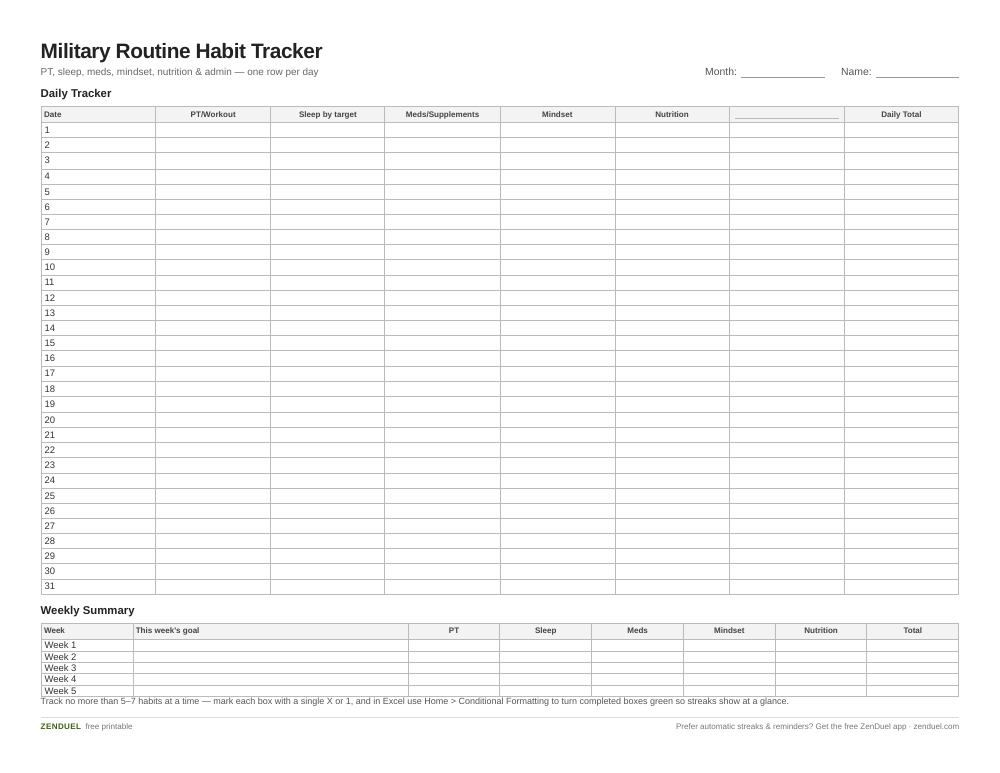
Our own template — free, no sign-up, no email required. A 31-day grid with six habit columns and daily totals, plus a weekly summary row with space for each week’s goal. US Letter (prints fine on A4). For Google Sheets, upload the .xlsx via File → Import.
Military Routine Habit Tracker (Excel / Google Sheets) Military Routine Habit Tracker (PDF)
Quick Answer
Use a single Excel sheet with one row per day and one column per routine (PT/workout, sleep, meds or supplements, mindset/journaling, nutrition, family or admin task). Mark each box with an X or 1 when done, add a weekly streak or completion count at the end of each row, and use conditional formatting so completed days turn green at a glance.
How to Set Up the Tracker
Start with a Dates column down the left side — one row per day, 30 or 31 rows for a full month, with the day of the week next to it so you can spot patterns (weekends slipping, Mondays getting skipped, etc.). Across the top, set up one column per routine you’re actually trying to hold: PT/workout, sleep (in bed by a target time), medication or supplements, mindset (journaling, meditation, or a gratitude line), nutrition (meals hit or water intake), and one open column for whatever is specific to your routine — physical therapy, a family call, or admin tasks like appointments and paperwork.
Keep the daily entry dead simple: a single character (X, 1, or a checkmark) per box, not a sentence. At the end of each week, add a row that sums completions per column so you can see which habit is strongest and which is slipping without doing any math in your head. A final column per day totaling how many habits you hit also works well if you want one number to glance at each morning.
For the PT/workout column specifically, consider splitting it into two sub-columns if you’re tracking something like the Army Combat Fitness Test or a personal fitness goal — one for ‘trained today’ (yes/no) and one short note field for what you did (run distance, lift, ruck time). That keeps the daily check-off fast while still giving you a record to look back on.
Making It Work for a Military-Style Routine
The habits that transfer best from service to civilian life are the ones with a fixed time attached — wake-up, PT, lights-out — so anchor your tracker columns to times, not just actions. A ‘sleep by [time]’ column is more useful than a vague ‘good sleep’ column because it’s binary and easy to check off consistently.
If you’re tracking something sensitive like medication adherence, sleep for PTSD-related issues, or mental health check-ins, keep that column simple (done/not done) rather than detailed — the goal is consistency, not a clinical log. The VA’s free PTSD Coach app is built for ongoing symptom tracking and grounding exercises and isn’t tied to separation date. Military OneSource’s free coaching (including its CoachHub tool) covers active duty, Guard, and Reserve service members and their families with no time limit, and is also available to veterans and retirees for a window of time after separation — worth using while you’re eligible, alongside a simple spreadsheet rather than replacing it.
Add a Notes or ‘mission’ row at the top of each week where you write one line about the goal for that week (e.g., ‘hit PT 5x’ or ‘lights out by 2200 every night’). It turns the sheet from a passive log into something you’re actively steering.

Tips / Common Mistakes
Don’t track more than 5–7 habits at once — a tracker with 15 columns gets abandoned within a week. Pick the routines that actually move the needle (PT, sleep, one mindset habit) and add more only once those are automatic. Use conditional formatting (Excel: Home > Conditional Formatting > Highlight Cell Rules) so an X or 1 automatically fills the cell green — it turns the sheet into a visual streak at a glance instead of something you have to read line by line. Keep one tab per month rather than one giant year-long sheet; it’s easier to review a month and reset than to scroll a massive grid. And don’t skip the weekly review row — the sheet’s real value isn’t the daily checkmark, it’s seeing the weekly total trend up or down so you can adjust before a bad week becomes a bad month.
Explore more: more free habit-tracking templates and guides.
Excel Habit Tracker for Veterans and Military Routines FAQs
Do I need Excel to use this habit tracker?
No — the spreadsheet works in Excel, and you can also open and edit it for free in Google Sheets or LibreOffice Calc. The download includes a format you can use in either.
Can I track PT, sleep, and medication in the same sheet?
Yes — that’s the point of a single-sheet tracker. Give each routine its own column, keep the daily entry to a single mark (X or 1), and use a weekly summary row to see completion per habit without separate spreadsheets.
How do I track a streak in Excel without formulas?
The simplest method is visual: mark each completed day and let conditional formatting color the cell. For a numeric streak, a basic SUM or COUNTIF across the week’s row gives you a completion count without needing complex formulas.
Is this tracker only for active-duty service members?
No — it’s built to work for active duty, Guard and Reserve, veterans, and anyone following a structured daily routine. The columns (PT, sleep, mindset, meds, admin) apply just as well after transition as during service.
Skip the Spreadsheet — Track It in ZenDuel
Habit streaks, mood tracking, and accountability duels in one free app — no template maintenance required. Get ZenDuel.
Want a calmer inbox? Subscribe to the free newsletter.
Photo by 2H Media on Unsplash.
