You don’t have a motivation problem, you have a tool problem. Most people quit habit tracking within a few weeks not because the habit was too hard, but because the tracking method felt like a chore on top of the habit itself.
Table of Contents
This guide breaks down what a spreadsheet does better, what an app does better, and how to decide in under five minutes. You’ll also get a concrete layout for a spreadsheet habit tracker you can start using today — we’ve got a free one attached to this post, no sign-up required.

Download the Free Habit Tracker Spreadsheet
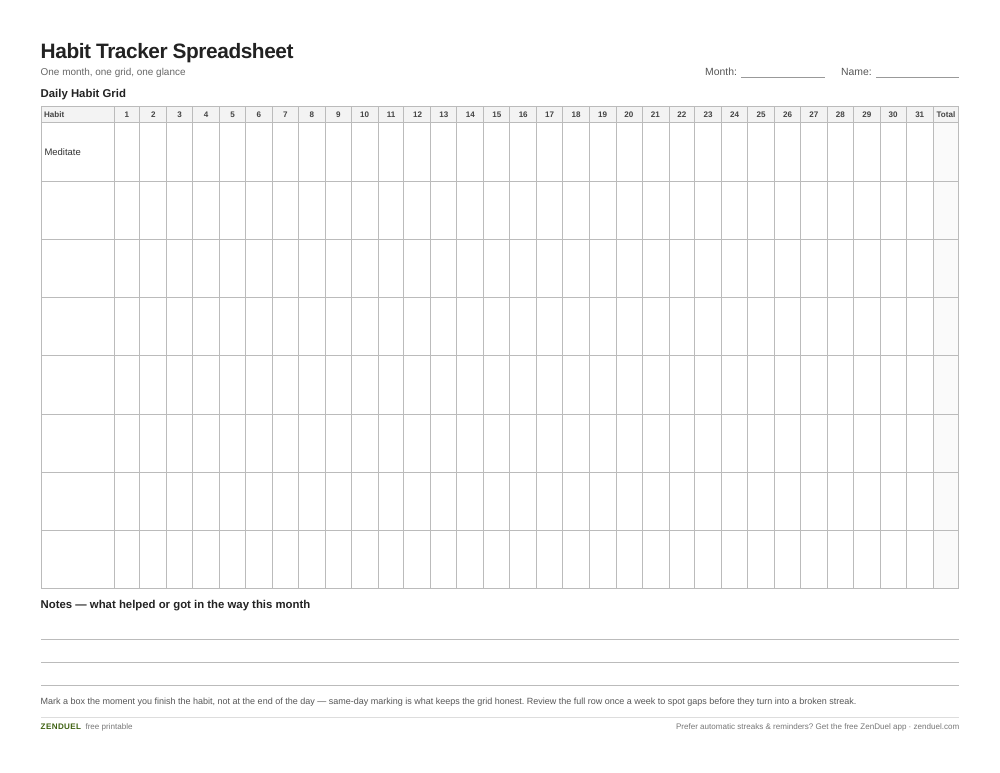
Our own template — free, no sign-up, no email required. Up to 8 habit rows, a 31-day grid, a monthly total column, and space for notes. US Letter (prints fine on A4). For Google Sheets, upload the .xlsx via File → Import.
Habit Tracker Spreadsheet (Excel / Google Sheets) Habit Tracker Spreadsheet (PDF)
Quick Answer
Use a spreadsheet if you want full control, zero cost, and a visual grid you check once a day or review weekly. Use an app if you need push-notification reminders, want it on your phone by default, or like streak badges and gamified motivation. Most people who stick with tracking long-term land on whichever one requires the fewest taps to update.
What a Spreadsheet Does Better
A spreadsheet is free, works offline, and never nags you to upgrade to a paid tier. It also puts the whole month in front of you at once — that’s the big one. Apps usually show today’s habits in a list; a spreadsheet shows every day of the month as a grid, so gaps and streaks are visible at a glance without scrolling or switching views.
The tradeoff is friction and reminders. A spreadsheet doesn’t ping your phone when it’s time to meditate, and you have to remember to open it. It also lives in one place by default — you’ll need Google Sheets or a synced Excel file (OneDrive/iCloud) if you want to check it off from your phone and your laptop.
The layout that works best: list your habits down the left column (rows), and the days of the month across the top (columns), one sheet per month. Each cell is a checkbox or an X you mark when you complete that habit that day. Add one more column on the far right labeled ‘Total’ that sums the checkmarks for the month, and optionally a ‘Current Streak’ column using a simple formula that counts consecutive completed days backward from today. Use conditional formatting so completed cells turn a color — that single visual cue is what makes a spreadsheet tracker feel satisfying instead of like homework. Leave a few blank rows at the bottom for notes on what helped or what got in the way that month. That’s the exact structure of the free spreadsheet attached to this post, so you can open it and start filling in habits immediately.
What an App Does Better
Apps win on reminders, convenience, and momentum tricks. Most habit-tracking apps send a notification at a time you set, let you log a habit in one tap from a home-screen widget, and show a visual streak (a chain, a flame icon, a calendar heatmap) that updates the instant you check something off. That instant feedback loop is harder to replicate in a spreadsheet unless you’re opening it constantly.
Well-known options cover different styles: Streaks and Way of Life are simple, no-frills daily checklists aimed at building consistency with minimal setup. TickTick folds habit tracking into a full task manager, useful if you already live in a to-do app. Habitify groups habits by time of day (morning/afternoon/evening) instead of one flat list. Habitica turns tracking into a game with an avatar and quests, which helps some people and feels gimmicky to others. Pricing models vary — some are one-time purchases, some are free with an optional paid tier for more habits or advanced stats, and some are subscription-only — so check the current pricing on each app’s own site before committing, since it changes.
The tradeoff: your data lives inside someone else’s app, free tiers often cap you at a handful of habits, and if the app gets discontinued or changes its pricing, you lose your history or have to pay to keep it.

Tips and Common Mistakes
Track 3-5 habits at most when you’re starting out. Both tools fail the same way when you overload them — a 15-row spreadsheet or a 15-habit app list turns daily tracking into its own task, and that’s when people quit the whole system, not just the habits.
Pick based on where you’ll actually see it. If you’re on your phone constantly, an app with a widget beats a spreadsheet you forget to open. If you work at a computer all day and like reviewing data, a spreadsheet you glance at during a coffee break will stick better than an app notification you swipe away.
Review weekly, not just daily. A single day of checkmarks doesn’t tell you much — set a recurring 5-minute slot once a week to look at the whole grid or the app’s weekly view and ask what’s working.
Don’t switch tools every month. The habit-tracking tool itself becomes a procrastination target (‘maybe a different app will fix this’) — pick one, give it 4-6 weeks, and judge based on whether you actually opened it most days, not on features you never use.
Explore more: more habit-building guides.
Habit tracker spreadsheet vs app FAQs
Which is better for building a habit: a spreadsheet or an app?
Neither is inherently better — the one you’ll actually open every day wins. If you want reminders and gamified streaks, pick an app. If you want a free, no-login, full-month view you control completely, pick a spreadsheet.
Can I use a spreadsheet habit tracker on my phone?
Yes, through the Google Sheets or Excel mobile app, as long as the file is saved to Google Drive, OneDrive, or iCloud so it syncs. It won’t send reminders on its own, so pair it with a recurring phone alarm or calendar event if you need a nudge.
How many habits should I track at once?
Start with 3-5. Tracking too many habits at once is one of the most common reasons people abandon tracking altogether, regardless of whether they’re using a spreadsheet or an app.
Skip the Spreadsheet — Track It in ZenDuel
Habit streaks, mood tracking, and accountability duels in one free app — no template maintenance required. Get ZenDuel.
Want a calmer inbox? Subscribe to the free newsletter.
Photo by Glenn Carstens-Peters on Unsplash.
