The first months with a newborn scramble every routine you used to rely on, which is exactly why a simple visual tracker helps so much. An Excel habit tracker gives you one place to glance at feeding times, sleep stretches, and the small self-care habits that keep you functional, without needing to remember anything or open a new app.
Table of Contents
This guide walks through building a free postpartum habit tracker in Excel from scratch, using checkboxes, color-coded conditional formatting, and a basic streak formula. No macros, no complicated setup, just a spreadsheet you can build in about fifteen minutes and start using today.

Download the Free Postpartum Habit Tracker
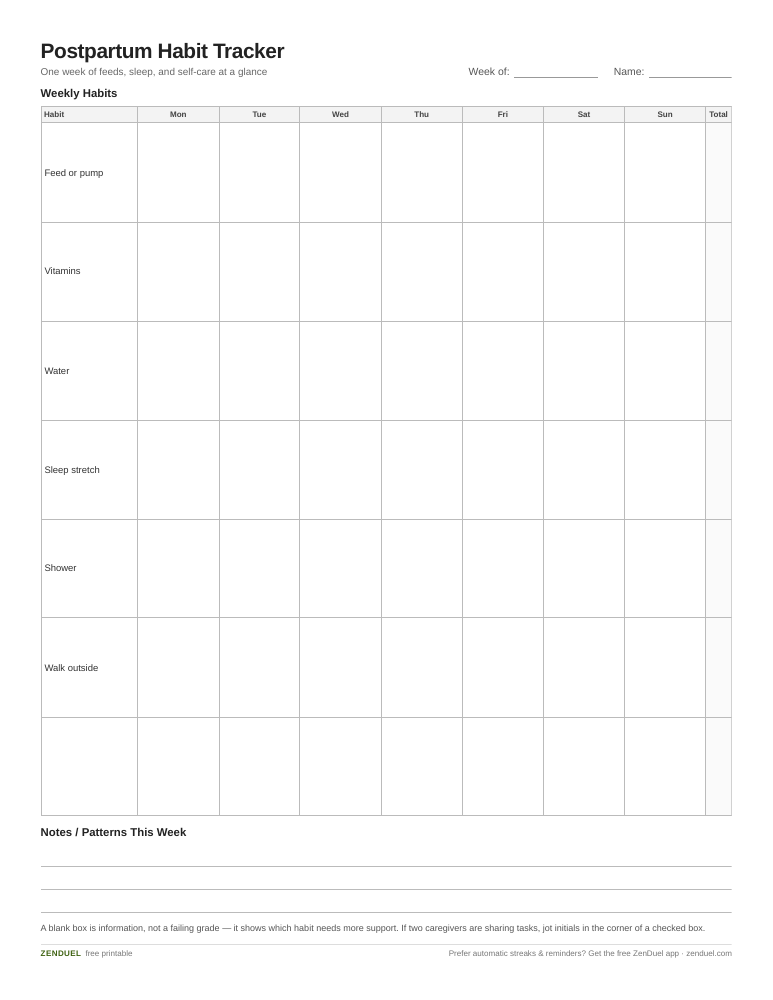
Our own template — free, no sign-up, no email required. Seven blank habit rows, checkboxes across a 7-day week, row and column totals, plus space for weekly notes. US Letter (prints fine on A4). For Google Sheets, upload the .xlsx via File → Import.
Postpartum Habit Tracker (Excel / Google Sheets) Postpartum Habit Tracker (PDF)
Quick Answer
Open a blank Excel workbook, list your postpartum habits (feed times, diaper changes, meds/vitamins, water intake, a short walk, a shower) down the left column and the days of the week across the top, then insert checkboxes in each cell. On Microsoft 365, the newer Insert > Checkbox feature links each checkbox to its cell automatically; on older, non-subscription versions you’ll need Developer tab > Insert > Form Controls > Checkbox instead, and each one has to be manually linked to a cell (right-click the checkbox > Format Control > set a Cell link) before it will actually show TRUE or FALSE. Once the boxes are checked and showing TRUE/FALSE, use Conditional Formatting to turn checked cells green, then add a SUM or COUNTIF formula at the end of each row and column to see daily and weekly totals at a glance.
Step-by-Step: Building the Tracker
Start with the layout. In row 1, label columns for each day (Mon–Sun) or, if you want to track around the clock instead of by calendar day, label them ‘Day 1,’ ‘Day 2,’ and so on since postpartum weeks rarely line up with a normal Monday. In column A, list the habits you actually need to track: feeding sessions, pumping, taking prenatal or postpartum vitamins, hydration, a stretch of sleep for you, a shower, or a few minutes outside. Keep the list short — five to eight habits is plenty when you’re running on little sleep.
Add checkboxes instead of typing X’s. If you have Microsoft 365, go to Insert > Checkbox (in the Cell Controls group) and select your tracking range — this drops a checkbox into every selected cell and the cell value updates to TRUE or FALSE automatically as you check it, no extra setup needed. If you’re on an older, non-subscription version of Excel, you won’t have that option and will need Developer tab > Insert > Form Controls > Checkbox instead — and those checkboxes do NOT store a TRUE/FALSE value on their own; they’re objects that float over the grid rather than live inside a cell. After placing each one, right-click it (a left-click just toggles it), choose Format Control, go to the Control tab, and set a Cell link to the cell underneath or beside it; only then will that cell show TRUE when checked and FALSE when unchecked. This cell-linking step has to be repeated individually for every checkbox — even copy-pasted ones still point to the original linked cell until you repoint them — which is the main reason it’s worth checking whether you have the newer Microsoft 365 version first.
Color-code with Conditional Formatting so progress is visible without reading anything. Select the range of cells holding your TRUE/FALSE values, go to Home > Conditional Formatting > New Rule, choose ‘Format only cells that contain,’ set the rule to Cell Value equal to TRUE, and pick a fill color like green. Now every box you check lights up, which matters when you’re scanning the sheet one-handed while holding a baby.
Add totals so you can see patterns, not just single days. At the end of each row, use =COUNTIF(B2:H2,TRUE) to count how many days that habit was completed that week. At the bottom of each day’s column, do the same to see how many habits you hit that day. A simple streak formula — comparing today’s count to yesterday’s and adding 1 if both are checked, otherwise resetting to 0 — can sit in a helper column if you want to track consistency over time, but it’s optional; the weekly totals alone are usually enough signal in the newborn stage.
Save the file somewhere you’ll actually reopen — a shared cloud folder if a partner is also filling it in, or pin it to your taskbar/dock. A tracker that requires hunting for the file gets abandoned within a week.
What to Track in the First Months
Newborns don’t yet run on a consistent internal clock, which is normal and typically starts to settle closer to the three-month mark, so resist the urge to track anything that assumes a fixed schedule too early. Instead, track patterns: roughly how many feeds happened, whether you got any stretch of uninterrupted rest, and whether basic self-care (water, a real meal, a shower) happened at all that day.
A short, predictable wind-down sequence — bath, feed, a quiet song or story — can often be introduced around six to eight weeks and is worth its own row once you start one, since consistency there tends to matter more than exact timing.
For parents, the habits worth tracking are usually less about the baby and more about you: did you sleep when the baby slept, did someone else take a night feeding so you got a longer stretch, did you step outside, did you eat something that wasn’t eaten standing up. These are the habits that actually protect your energy through the fourth trimester.

Tips and Common Mistakes
Don’t overbuild the sheet. A tracker with fifteen columns and color-coded categories looks impressive but won’t survive week two of newborn sleep deprivation — keep it to habits you can check off in five seconds.
Split tracking between partners if there are two of you. Add a column or initials next to each entry so you can see who covered which feed or task, which helps spot when one parent is quietly carrying more of the load.
Don’t treat missed days as failures. A blank row is data, not a grade — it tells you which habits need more support (a reminder alarm, a partner taking that task) rather than being something to feel bad about.
Revisit the habit list every few weeks. What matters in week two (surviving feeds) looks different by week eight (starting a bedtime routine), so edit the rows rather than starting a brand-new sheet each time.
Explore more: more habit-building guides.
Excel Habit Tracker for New Parents FAQs
Do I need Excel, or does Google Sheets work too?
Either works. The same checkbox-plus-conditional-formatting approach is available in Google Sheets (Insert > Checkbox, then Format > Conditional Formatting), which is often easier to share and fill in from a phone.
What habits should a postpartum tracker actually include?
Keep it short: feeding or pumping sessions, medication or vitamins, water intake, at least one longer sleep stretch, and one self-care item like a shower or short walk. Add a bedtime-routine row once you start one, usually around six to eight weeks.
Is a spreadsheet better than a habit-tracking app for this?
A spreadsheet is fully customizable and free, which matters when postpartum needs change week to week. An app can be faster to tap on a phone one-handed, so some parents use both — the app for quick logging, the spreadsheet for the weekly-view picture.
How do I stop the tracker from becoming another chore?
Keep the habit list to under eight items, put it somewhere you already look (phone home screen, shared cloud folder), and treat missed entries as information rather than something to catch up on retroactively.
Why isn’t my checkbox showing TRUE or FALSE?
If you used Developer tab > Insert > Form Controls > Checkbox, the box doesn’t store a value until you link it: right-click it, choose Format Control, and set a Cell link on the Control tab. Each checkbox needs this done individually. The newer Insert > Checkbox option in Microsoft 365 skips this step and links automatically.
Skip the Spreadsheet — Track It in ZenDuel
Habit streaks, mood tracking, and accountability duels in one free app — no template maintenance required. Get ZenDuel.
Want a calmer inbox? Subscribe to the free newsletter.
Photo by 2H Media on Unsplash.
