If every habit tracker you’ve tried online looks like a scrapbook page — pastel icons, tiny stickers, a dozen fonts — it’s easy to give up before you’ve tracked a single day. A minimalist habit tracker strips all of that away and leaves you with what actually works: a grid, a pen, and a box to fill in.
Table of Contents
Want it done in ten seconds? Grab our free minimalist tracker below — no sign-up, no email. Prefer to customize? This guide also shows you exactly how to build your own no-frills version in a free tool you already have — Google Sheets — and export it as a clean, printable PDF in a few minutes. No sign-ups and no design skills required.

Download the Free Minimalist Habit Tracker PDF
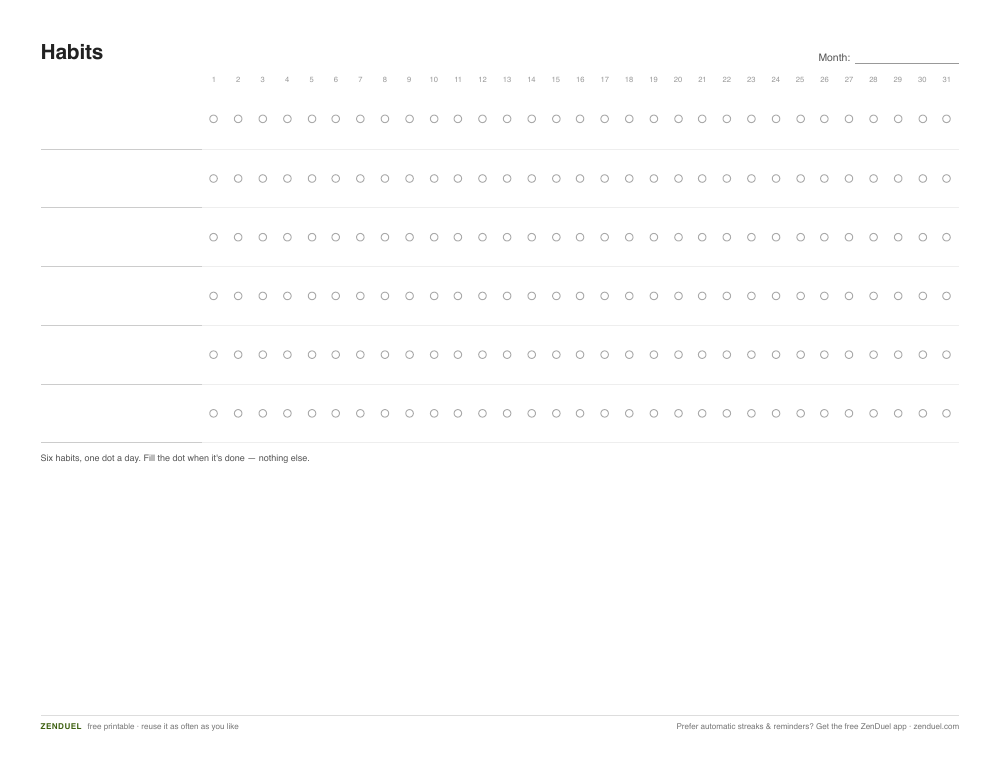
Our own printable — free, no sign-up, no email required. Six habits, one dot per day, nothing else. Landscape US Letter (prints fine on A4).
Quick Answer
A minimalist habit tracker is just a grid: your habits listed down the left side, the days of the month across the top, and a box or checkmark for each day you complete the habit. The fastest way to get a free, no-frills version is to build it yourself in Google Sheets (habits in column A, days in row 1, checkboxes in the grid) and export it as a PDF with File > Print > Save as PDF — it takes about five minutes and costs nothing.
How to Build Your Own Minimalist Habit Tracker PDF
Open a new blank spreadsheet in Google Sheets (free with any Google account) and list only the habits that matter most right now down column A, starting in row 2. Keep it to five or six concrete, specific habits — “drink water,” “read 10 pages,” “walk 20 minutes” — rather than a crowded list of vague ones. A tracker with fifteen habits crammed onto one page defeats the purpose of going minimalist.
Across row 1, starting in column B, number the days of the month (1 through 30 or 31). Select the empty grid under those day numbers, then go to Insert > Checkbox — Sheets fills the entire selected range with clickable checkboxes in one step, which is the fastest way to get a clean daily grid without drawing a single box by hand.
Strip out any color, borders, or shading Sheets adds by default — right-click the selected range, choose Clear formatting, and leave plain black gridlines. That default-off look is what keeps the sheet genuinely no-frills instead of turning into another cluttered tracker.
When it’s ready, go to File > Print, set the layout to landscape if your habit list is wide, and choose Save as PDF as the destination (or use File > Download > PDF Document). That PDF is now yours to print at home, save on your phone, or reuse every month — no watermark, no email opt-in required, because you made it yourself instead of downloading it from someone else.
How to Actually Use It Day to Day
If you printed the sheet, put it somewhere you’ll see it without going looking for it — taped inside a cabinet door, on the fridge, next to your coffee maker, or clipped to a desk. A tracker buried in a drawer or folder gets forgotten within a few days.
Fill it in at the same time each day, ideally right after you do the habit rather than trying to remember everything at bedtime. Pairing the check-in with an existing routine (after brushing your teeth, after your morning coffee) makes it far more likely to stick.
Don’t stress over a missed day or a blank box — the tracker’s job is to show you the pattern, not to guilt you. If a habit goes untracked for a week straight, that’s useful information: either the habit needs to change, or the reminder placement does.
Review the sheet at the end of the month before printing a fresh one. Keep habits that are sticking, drop or adjust ones that consistently go untracked, and resist the urge to add new habits mid-month — one change at a time keeps the tracker minimal and keeps you from feeling overwhelmed.
Tips / Common Mistakes
Biggest mistake: tracking too many habits at once. If you’re skipping the sheet because filling it in feels like a chore, cut the list in half.
Second mistake: treating the tracker as the goal. Filling in a box is not the win — doing the habit is. The tracker only makes the pattern visible, so don’t let the streak itself become the pressure that makes you quit.
Save your original Google Sheet (don’t just keep the exported PDF) so starting next month’s tracker is a two-minute copy-and-relabel job instead of rebuilding the grid from scratch.
If pen-and-paper isn’t realistic for you, skip printing entirely and just check the boxes directly in Google Sheets on your phone or tablet — the format matters less than the consistency of filling it in.
Explore more: more habit-building guides and printables.
Minimalist habit tracker printable FAQs
Is there a ready-made PDF I can just download?
Yes — download our free minimalist habit tracker PDF near the top of this guide (six habits, one dot per day, no sign-up). If you’d rather tailor it to your habits, this guide also walks you through building your own in Google Sheets and exporting it as a PDF in about five minutes, so the finished tracker is set up exactly the way you want it.
How many habits should I put on a minimalist tracker?
Five or six is a good ceiling. A longer list turns a five-second daily check-in into a chore, which is exactly what a minimalist design is trying to avoid.
Do I need any special software to make the PDF?
No — Google Sheets is free with any Google account, and it can export directly to PDF through File > Print > Save as PDF or File > Download > PDF Document. No design software or paid app is required.
Should I use checkboxes, dots, or filled-in boxes?
Whichever you’ll actually keep using. Google Sheets’ built-in checkbox (Insert > Checkbox) is the fastest to set up, but a plain box you fill in by hand works just as well once printed. Pick one style and stick with it so filling in the sheet stays fast and automatic.
What if I miss several days in a row?
Leave the boxes blank and keep going from today. A gap in the grid is just data showing you where the habit needs a nudge — it’s not a reason to scrap the tracker.
Skip the Spreadsheet — Track It in ZenDuel
Habit streaks, mood tracking, and accountability duels in one free app — no template maintenance required. Get ZenDuel.
Want a calmer inbox? Subscribe to the free newsletter.
Photo by Paico Oficial on Unsplash.

1 thought on “How to Make a Free Minimalist Habit Tracker PDF (5-Minute DIY Template)”
Comments are closed.